Colocation dallas tx: Secure, Low-Latency Dallas Data Center Solutions

Soraxus Assistant
January 12, 2026 • 26 min read
So, you’re thinking about colocation. It’s a smart move. Instead of footing the enormous bill to build and run your own data center, you can lease space in a facility that already has enterprise-grade power, cooling, and network infrastructure sorted out. You bring your own servers and maintain full control over your hardware, while they handle the rest.
And when it comes to where to set up shop, colocation in Dallas, TX, is a top-tier choice. The city has become a massive hub for a reason, blending a perfect geographic location with affordable power and an incredible network ecosystem.
Why Dallas Is a Premier Colocation Hub
Let's break down exactly why Dallas has become such a critical piece of North America's internet backbone. It’s not just another dot on the map; it’s a strategic decision that gives businesses a real competitive edge.
The Geographic Sweet Spot
Dallas sits right in the middle of the United States, and that’s its superpower. This central location is a huge win for minimizing network latency—that tiny, yet critical, delay it takes for data to travel from your server to your end-user.
For instance, a user in Los Angeles and another in New York can both access a Dallas-based server with remarkably similar, low-latency travel times. This creates a consistently fast and responsive experience for a nationwide audience. For any application where milliseconds count, this is a game-changer.
- Online Gaming: A Dallas location keeps the playing field even and the gameplay smooth for everyone, no matter which coast they're on. A player in Seattle gets a similar connection quality to a player in Miami.
- SaaS Platforms: Your financial analytics application feels snappy and responsive for all your users, whether they're pulling reports in San Francisco or Miami.
- Content Delivery: It’s the perfect central point to cache video files or website images and serve them quickly to the entire country, reducing buffering and load times.
Unbeatable Power and Connectivity
Location is only half the story. Dallas also delivers a fantastic business environment, especially for operations that consume a lot of power. The Dallas-Fort Worth area is a true giant in the U.S. colocation market, with some projections showing its data center capacity could double by the end of 2026.
A huge reason for this growth is the cost of energy. Businesses in Dallas pay around 9.72 cents per kWh for electricity, which is a whopping 28% below the U.S. average. When you're running racks packed with servers 24/7, those savings add up fast. A practical example: for a server deployment consuming 5kW, this price difference could translate into thousands of dollars in savings annually compared to hosting in higher-cost regions. You can dig deeper into the trends driving Dallas's data center boom to see the full picture.
This explosive growth is built on a foundation of incredible network density. Dallas is home to a rich, carrier-neutral ecosystem.
Think of a carrier-neutral facility like a major international airport for your data. Instead of being locked into one airline (network provider), you have dozens to choose from. This gives you the power to find the fastest, most reliable, and most cost-effective routes for your data to travel anywhere in the world.
This freedom of choice is crucial. It means you get competitive pricing, diverse network paths for better reliability, and the ability to plug directly into major cloud providers and business partners with low-latency connections.
To put it simply, the advantages of choosing Dallas are clear and impactful. Here's a quick look at how these benefits translate directly to your business operations.
Dallas Colocation Advantages at a Glance
| Strategic Advantage | Impact on Your Business |
|---|---|
| Central U.S. Location | Provides balanced, low-latency connections to users on both coasts, improving application performance and user experience. |
| Affordable Power Costs | Significantly reduces operational expenses (28% below national average), especially for high-density server deployments. |
| Rich Network Ecosystem | Offers a wide choice of network carriers, ensuring competitive pricing, high-performance connectivity, and network redundancy. |
| Robust Infrastructure | Home to a massive and growing number of world-class data centers with enterprise-grade security and reliability. |
Choosing colocation in Dallas, TX, isn't just about finding a place to rack your servers. It’s about plugging your business directly into one of the most powerful and strategic digital crossroads on the planet.
Your Vendor Selection Checklist for Dallas Colocation
Choosing the right colocation partner in Dallas is a big deal. It’s a decision that will directly affect your uptime, your security, and your ability to grow. You have to look past the slick marketing brochures and dig into what really matters. This checklist is your guide to asking the tough questions—the ones that reveal a provider’s true capabilities.
Think of it less like renting space and more like finding a partner to protect your digital foundation. Your goal is to get proof, not just promises, across four make-or-break pillars: Power, Network, Security, and Support. Let's break down what you absolutely need to verify in each area.
This quick decision tree can help you frame your thinking and see if Dallas colocation is the right move for your core business needs.
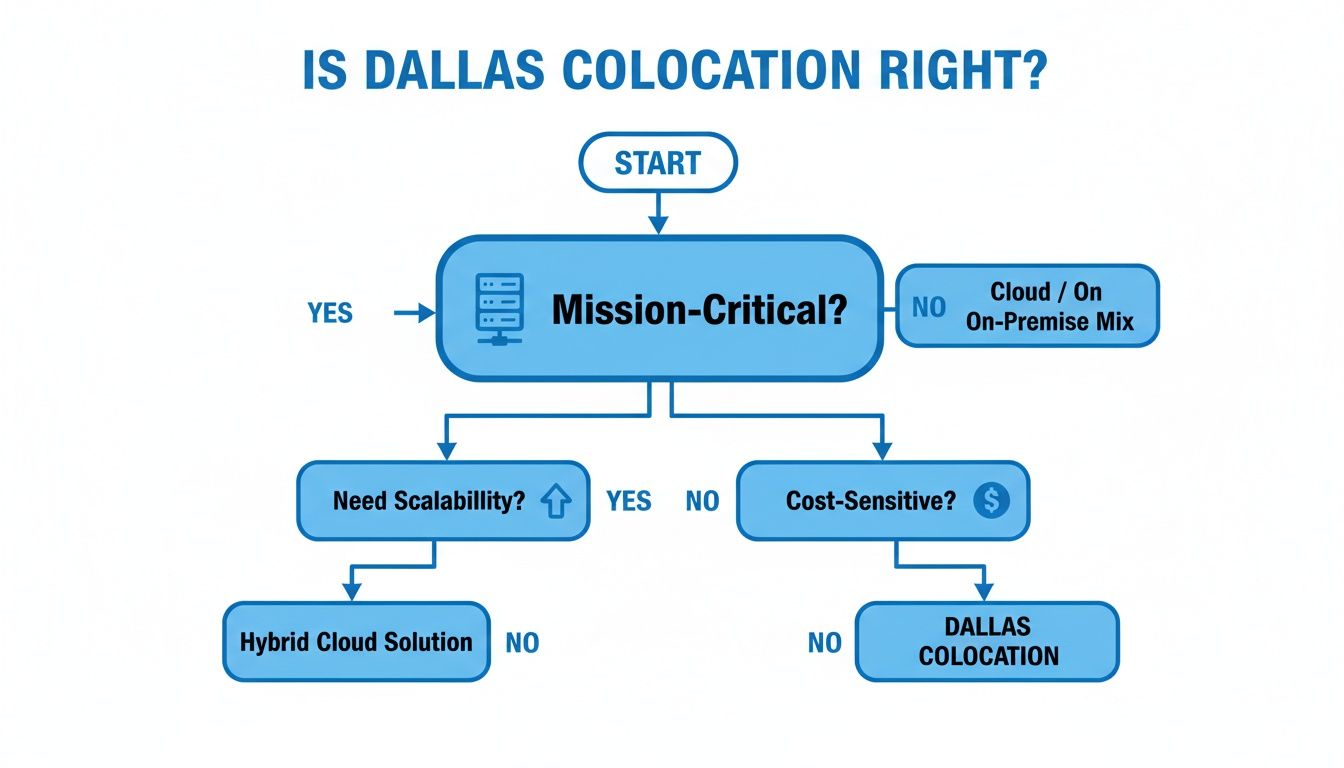
As the flowchart shows, if your applications are mission-critical, need room to scale, and you’re keeping a close eye on operational costs, then colocation in Dallas is a strategy that just makes sense.
Uninterruptible Power Redundancy
Power is everything in a data center. A split-second outage can cause catastrophic data loss, halt revenue, and seriously damage your reputation. Asking "do you have backup power?" isn't nearly enough. You need to get into the weeds of their power delivery systems.
The gold standard here is A+B power redundancy. This isn't just a buzzword; it means your gear gets power from two completely independent electrical circuits. If the primary "A" feed goes down—whether it's a utility problem, a faulty piece of hardware, or even just maintenance—the "B" feed takes over instantly. For example, a server with dual power supplies would have one plugged into the A circuit and the other into the B circuit, ensuring it remains online even if an entire power distribution unit (PDU) on one side fails.
Here are the non-negotiable questions to ask:
- Do you provide true A+B power feeds all the way to my cabinet? Make them confirm the redundancy extends to your actual rack, not just somewhere on the data center floor.
- What’s your UPS (Uninterruptible Power Supply) setup? You’re looking for N+1 or 2N configurations. This means they have at least one more component than needed, so if one fails, another is already there to pick up the slack.
- What are your fuel contracts for backup generators? How much fuel is on-site right now, and how fast can you get more? A provider with a 48-hour on-site fuel supply and priority refueling contracts is prepared for a real, extended outage.
Network Resilience and Flexibility
A data center is only as good as its connection to the rest of the world. Dallas is a connectivity hub, so settling for a mediocre network is a huge mistake. The magic word you’re looking for is carrier neutrality.
A carrier-neutral facility is one that lets you choose from multiple network providers all under one roof. This creates a competitive market for your bandwidth, which pushes prices down and gives you the freedom to pick the best-performing, lowest-latency path to your users.
A carrier-neutral facility is like an international airport with dozens of competing airlines. You aren't stuck with one airline's high prices or limited routes. You can shop around, blend carriers for redundancy, and always find the most direct flight to your destination.
To really vet a provider's network, ask these questions:
- How many carriers are physically present in your building? The more, the better. More carriers mean more options, more competition, and more resilience.
- Can you provide blended bandwidth? A great provider can offer a pre-mixed, optimized blend of top-tier networks on a single connection, giving you built-in redundancy without the management headache. For instance, if one major carrier has a regional outage, traffic automatically fails over to the other carriers in the blend.
- What’s the process for getting a cross-connect? How long does it take and how much does it cost to get a physical connection run to a new carrier in the facility?
Multi-Layered Physical Security
This one is simple: physical security is non-negotiable. You need absolute certainty that your expensive hardware is locked down tight and protected from theft, damage, or unauthorized access. Modern data center security isn't just a lock on the door; it's a series of overlapping defenses.
Think of it like getting into a bank vault. You don’t just stroll in. You have to get past guards, locked doors, and cameras first. A truly secure data center works the same way.
Here are the key security layers to verify:
- Perimeter Security: Look for fences, gates, and actual 24/7 on-site security staff watching the property.
- Facility Access Control: At a minimum, keycard access is required just to get in the building's front door.
- Data Hall Access: This is where it gets serious. You want to see biometric scanners (like fingerprint or iris) and mantraps—those two-door systems that only let one person through at a time—to prevent anyone from "tailgating" behind an authorized person.
- Cabinet Security: Your individual cage or cabinet must be locked, with access restricted only to your team and specifically authorized data center staff.
- Constant Surveillance: High-definition cameras should be monitoring every critical area, with footage stored for a long time in case of an audit or incident.
Expert Support and Service Level Agreements
Even the best-built facility will have issues eventually. When something goes wrong, the quality and speed of the support team is what matters most. This is where Remote Hands services become a lifesaver, especially if your team isn’t based in Dallas. Remote Hands is your ability to have on-site technicians do physical work for you—anything from rebooting a stuck server to swapping out a bad drive.
A provider’s promises are only as good as their Service Level Agreement (SLA). This is the legal contract that guarantees their uptime for power, cooling, and network. A strong, financially-backed SLA with clear penalties for failure is the sign of a provider that stands behind its service. As the U.S. colocation market grows toward a projected $65.45 billion by 2030, the quality of these agreements is more important than ever. You can explore the research on data center market growth to see what’s driving this trend.
This checklist gives you a solid framework for comparing providers head-to-head. Use this table to keep your notes organized as you talk to potential partners in Dallas.
Key Questions for Evaluating Colocation Providers
| Evaluation Category | What to Verify | Critical Question to Ask |
|---|---|---|
| Power Redundancy | The level of fault tolerance in the power infrastructure, from the utility grid to your equipment. | "Can you confirm you provide true A+B power to the cabinet level, and what is your UPS configuration (e.g., N+1, 2N)?" |
| Network & Connectivity | The diversity and quality of network carriers available and the ease of connecting to them. | "Are you carrier-neutral, how many carriers are on-net, and what is the typical cost and lead time for a cross-connect?" |
| Physical Security | The multiple layers of protection in place to prevent unauthorized physical access to your hardware. | "Walk me through your security layers, from the property perimeter to my cabinet, including biometrics and mantraps." |
| Support & Remote Hands | The availability, expertise, and scope of on-site technical assistance. | "What tasks are included in your standard Remote Hands service, what are the response time guarantees, and what costs extra?" |
| Service Level Agreement | The contractual guarantees for uptime and the remedies provided if those guarantees are not met. | "Can I see your standard SLA? What are your specific uptime guarantees for power and network, and what are the credits for a breach?" |
| Out-of-Band (OOB) Access | The method for accessing your devices' management interfaces, even if the primary network is down. | "Do you provide dedicated Out-of-Band network access, and is it physically separate from the production data network?" |
| DDoS Mitigation | The provider’s capability to detect and filter malicious traffic before it impacts your services. | "What on-site DDoS mitigation services do you offer? Is it an always-on or on-demand service, and what is the capacity?" |
| Pricing & Billing | The clarity and predictability of your monthly costs, including power, bandwidth, and add-on services. | "Can you explain your billing model for power? Is it metered or fixed? What are your bandwidth commit and burst rates?" |
By methodically working through these points with each potential provider, you'll be able to see beyond the sales pitch and identify a partner that truly has the infrastructure and expertise to support your business.
Understanding Colocation Pricing Models and SLAs
When you're evaluating colocation in Dallas, TX, the conversation quickly moves from technical specs to the dollars and cents. You need to get into the fine print of pricing and service guarantees, because that's where you'll find what truly separates one provider from another. A transparent partner will lay it all out, helping you build a predictable budget and sidestep any nasty billing surprises.
Think of it less like buying a pre-built computer and more like custom-ordering one. You don't just get a single sticker price; you choose the specific components—the space, the power, the network connection—and each one has its own cost.
Breaking Down the Core Pricing Components
Typically, your monthly colocation bill boils down to three main things: the physical space your gear takes up, the power it draws, and the network bandwidth it needs to talk to the world.
- Cabinet Space: This is the physical real estate for your servers. It’s usually sold by the "U" (a 1.75-inch rack unit), in partial racks (like a quarter or half cabinet), or as a full, private cabinet that's typically 42U or 48U tall.
- Power: This is often the biggest piece of the puzzle. Some providers use metered billing, where you pay for exactly what you consume. Others offer circuit-based billing, where you reserve a set amount of power—say, a 20-amp circuit—for a flat monthly rate. For example, a business with spiky, unpredictable power usage might prefer a fixed circuit to budget effectively, while a company with consistent, low usage could save money with a metered plan.
- Bandwidth: This is your data's connection to the internet. Common models include metered billing (based on data transferred), unmetered (a fixed-speed port for a flat fee), or blended bandwidth, where a provider mixes several top-tier carriers into a single, highly resilient connection.
For a deeper dive, check out our complete guide on the cost of colocation to see how these variables fit together.
Translating the Language of SLAs
While the price tells you what you'll pay, the Service Level Agreement (SLA) tells you what you're paying for. The SLA is the provider's contractual promise to you, guaranteeing specific levels of uptime for power, cooling, and the network. It’s the document that gives your agreement its teeth.
Without a solid SLA, all those marketing claims are just talk. This contract is what holds the provider accountable, defining the service credits you're owed if they fail to meet their uptime promises.
An SLA is the ultimate proof of a provider's confidence in their own infrastructure. A strong, financially-backed agreement shows they are willing to put their money where their mouth is, giving you peace of mind that your mission-critical applications are in safe hands.
You’ll hear the term "five-nines" uptime a lot, which refers to 99.999% availability. It sounds impressive, but what does that mean in reality? It translates to a maximum of just 5.26 minutes of potential downtime over an entire year.
Here’s a quick breakdown of what those percentages actually mean for your business:
| Uptime Guarantee | Potential Downtime Per Year |
|---|---|
| 99.9% ("Three-Nines") | 8.77 hours |
| 99.99% ("Four-Nines") | 52.6 minutes |
| 99.999% ("Five-Nines") | 5.26 minutes |
Ultimately, choosing a colocation Dallas, TX provider means looking beyond the facility tour. By carefully analyzing the pricing models and scrutinizing the SLA, you can lock in a partnership that gives you financial predictability and the rock-solid reliability your business needs to thrive.
Real-World Scenarios for Colocation in Dallas
It’s one thing to talk about specs and features, but the real power of colocation in Dallas, TX, becomes clear when you see how it solves real-world business problems. Moving your infrastructure isn't just a tech decision; it's a strategic move. Let's walk through a few common situations where Dallas colocation isn't just a good idea—it's the game-changer that turns an operational headache into a competitive edge.
These examples show how different industries can tap into Dallas's unique advantages to solve very different problems, whether it's delivering blazing-fast performance or building a rock-solid, reliable service for a national audience.
The Low-Latency Gaming Experience
Let's say you're running a popular online multiplayer game. You've got players all over the United States, from California to Florida, and your number one enemy is network latency, better known as "ping." When a player on the West Coast has a sky-high ping compared to someone on the East Coast, the game feels unfair and laggy. That’s a fast track to losing players.
If you stick your game servers on one of the coasts, you’re instantly giving half your player base a bad experience. This is where Dallas's central geography becomes your secret weapon.
- The Problem: You need to give every player, regardless of their location, a fair and low-latency gaming experience.
- The Dallas Solution: Hosting your servers in Dallas effectively splits the difference between both coasts. A player in Los Angeles and a player in New York can connect to your Dallas server with surprisingly similar, low ping times.
- The Result: Gameplay feels snappy and responsive for everyone. You've leveled the competitive playing field, satisfaction goes up, and your game keeps its players because the experience is consistently solid.
When every millisecond counts—and in gaming, it always does—Dallas acts as the great equalizer. It ensures a player's performance isn't limited by their zip code, but by the quality of your central infrastructure.
The Always-On SaaS Platform
Now, picture a Software-as-a-Service (SaaS) company. You provide a mission-critical tool to thousands of businesses nationwide, and your platform simply cannot go down. For your customers, downtime isn't just an inconvenience; it costs them real money and torches your reputation.
You need more than just reliable servers. You need an infrastructural fortress built with redundant power, a resilient network, and serious protection against threats like Distributed Denial of Service (DDoS) attacks.
- The Problem: You have to guarantee almost perfect uptime and defend your platform against crippling DDoS attacks that could knock it offline for hours.
- The Dallas Solution: A top-tier Dallas data center gives you the foundation you need. With A+B power redundancy, a local utility outage won't touch your servers. A carrier-neutral facility means you have multiple network providers, so a problem with one carrier won't cut you off from the internet. Most importantly, integrated, always-on DDoS mitigation scrubs malicious traffic long before it has a chance to harm your application.
- The Result: Your SaaS platform achieves the high availability your customers are paying for. It stays online and performs flawlessly, even through a regional power grid failure or a massive volumetric attack. This builds immense trust and lets you confidently offer your own financially-backed SLAs.
The Scalable Managed Service Provider
Finally, think about a Managed Service Provider (MSP). Your entire business is built on providing enterprise-grade hosting and infrastructure management to your own clients. The thought of building and certifying your own data center is daunting—it means a massive capital investment in construction, power systems, cooling, and physical security. That’s money you’d rather put toward growing your business.
You need a way to offer top-shelf services without the crushing upfront cost and endless maintenance of owning the building yourself.
- The Problem: You need to give your clients secure, compliant, and highly available hosting without spending millions to build a private data center.
- The Dallas Solution: Colocation lets you lease space in a facility that already has the certifications (like SOC 2) and robust infrastructure your enterprise clients demand. You can rack your own high-performance gear, like the hardware in these Dallas, Texas bare metal server offerings, to create completely custom solutions. And with Remote Hands services, you can manage it all without needing your own staff on-site 24/7.
- The Result: As an MSP, you can go head-to-head with much larger competitors, offering enterprise-level reliability and security on a flexible, operational expense model. This frees you up to focus on what you're best at—serving your clients—while leaving the facility management to a trusted partner.
Optimizing Network Performance and Security
Your infrastructure is only as good as the network connecting it to the world. A powerful server in a facility with a sluggish, unreliable network is like a race car stuck in city traffic—it has incredible potential but can't actually perform. This is why choosing a colocation Dallas, TX provider with a deep network ecosystem is one of the most critical decisions you'll make.
Think of Dallas's connectivity fabric as a major international airport. A small regional airport might have a handful of routes, but a massive hub like DFW offers hundreds of direct flights to destinations worldwide. That density means you can always find the fastest and most efficient path to get where you're going.
A carrier-neutral data center in Dallas works the same way. It gives you direct access to dozens of network providers and major internet exchange points (IXPs) all under one roof. The competition drives down costs and, more importantly, gives you the power to build a truly resilient, fault-tolerant network.
Architecting High-Performance Networks
In an environment like this, you can blend multiple carriers to ensure your services stay online even if one provider has a bad day. But this isn't just about avoiding downtime; it's about delivering superior performance.
For instance, a SaaS platform can leverage this multi-carrier setup to dynamically route traffic over the lowest-latency path for each individual user. A practical example is using Border Gateway Protocol (BGP) with two different ISPs; if one ISP's path to a user in Chicago becomes congested, BGP can automatically reroute traffic through the second ISP for better performance.
A dense network ecosystem isn't a luxury; it's the foundation of high availability. The ability to choose, blend, and switch between carriers gives your infrastructure the agility to navigate around internet congestion and outages, safeguarding your revenue and reputation.
By selecting a provider that offers this level of connectivity, you're not just renting space and power. You're plugging into a strategic asset that directly enhances how you deliver your services.
Defending Against Modern Cyber Threats
Once your high-performance network is in place, you have to protect it. Today’s threat landscape is filled with sophisticated attacks designed to overwhelm your infrastructure and knock your services offline. These threats go way beyond simple network floods.
Attackers now use a cocktail of methods to maximize disruption:
- Volumetric Attacks (Layer 3/4): These are the classic brute-force floods, designed to completely saturate your network connection with a firehose of junk traffic.
- Protocol Attacks: These are more subtle, targeting weaknesses in network protocols themselves to exhaust the resources of servers, firewalls, or load balancers.
- Application-Layer Attacks (Layer 7): These are the trickiest to stop. They mimic legitimate user traffic to target specific functions of your application, making them incredibly difficult to distinguish from real customers.
A successful DDoS attack can cause hours of downtime, leading to lost revenue, frustrated customers, and lasting damage to your brand. This reality has made multi-layered, always-on DDoS mitigation an absolute must for any serious online business.
The Necessity of Always-On DDoS Mitigation
Relying on a reactive, on-demand DDoS service just doesn't cut it anymore. By the time you detect an attack and manually "swing" your traffic over to a scrubbing center, your services might have already been offline for several critical minutes.
Always-on DDoS mitigation completely changes the game. It works by constantly routing all of your traffic through a distributed network of scrubbing centers. This system inspects every single packet in real-time, instantly identifying and filtering out malicious traffic before it ever gets close to your infrastructure.
Here’s a practical example: Imagine a popular e-commerce site on Black Friday. An attacker launches a sophisticated Layer 7 attack that mimics thousands of users adding items to their carts. With an always-on system, this malicious traffic is identified and dropped in sub-second time, while legitimate shoppers continue their transactions without a single hiccup.
This proactive approach ensures your online presence is not just housed securely but is actively defended 24/7. Learning more about network security best practices can help you prepare, but choosing a Dallas colocation partner who integrates this level of protection is essential for maintaining uptime.
Finding the Right Dallas Colocation Partner
Choosing a provider for colocation in Dallas, TX isn't just about ticking boxes on a feature list. It's about finding a true partner for your infrastructure. The right facility won't just meet your technical needs; it will become a core part of your operational strength.
Think about the non-negotiables. You're looking for rock-solid A+B power redundancy to keep the lights on, no matter what. You need physical security that goes beyond a simple lock and key—we're talking biometric scanners, 24/7 video surveillance, and strict access protocols. And the network? It has to be carrier-neutral, giving you the freedom to connect with the providers that best serve your customers across the country.
More Than Just a Data Center
What really separates a good provider from a great one is the human element and their commitment to service. This is where the concept of a "vendor" evolves into a "partner."
Expert 24/7 remote hands support is a perfect example. These aren't just technicians; they're your trusted team on the ground. When you need a drive swapped or a cable re-patched at 3 AM, they're there, saving you the time and expense of a trip to Dallas.
The real proof of a provider's confidence is in their Service Level Agreement (SLA). A strong, financially-backed SLA isn't just a piece of paper; it's their promise. It’s a guarantee that they stand behind their uptime claims and are willing to put their money where their mouth is.
This commitment, paired with responsive, expert support, is what turns a colocation service from a basic utility into a strategic asset. You know that when you need help, you're getting someone who is genuinely invested in keeping your business online.
Your infrastructure is too important to settle for anything less than a home built on reliability and trust. Ready to find that fit? Let's connect you with a solutions expert to map out a colocation plan that hits your specific operational and financial targets.
Got Questions About Dallas Colocation? We've Got Answers.
Stepping into the world of data centers can feel a little overwhelming. Let's clear up some of the most common questions people have about colocation in Dallas, so you can move forward with confidence.
What’s the Real Difference Between Colocation and a Dedicated Server?
Think of it like owning a condo versus renting an apartment.
With colocation, you own your server hardware—the physical box is yours. You're just leasing the "condo" for it inside a data center: the rack space, power, cooling, and network connection. This gives you total control over your hardware specs.
With a dedicated server, you're renting the server itself from the provider. It's more like a fully-furnished apartment. It's convenient and requires less upfront cash, but you don't own the hardware.
How Much Should I Expect to Pay for Colocation in Dallas?
There's no single sticker price. The cost really boils down to three things: how much cabinet space you need (a full rack, half rack, or just a single server space), how much power you'll draw (measured in kilowatts or amps), and your bandwidth needs.
A single server might start in the low hundreds per month. But for a full cabinet packed with high-powered gear, you could be looking at $1,500 or more. The only way to know for sure is to get a quote based on your specific setup.
Think of colocation costs like a utility bill for your infrastructure. The more resources you consume—space, power, and data—the higher the cost. This pay-for-what-you-use model ensures you aren't overspending on resources you don't need.
What Are "Remote Hands" and Why Do They Matter So Much?
Remote hands is a lifesaver. It’s a service where skilled on-site data center technicians act as your hands and eyes, performing physical tasks on your gear at your request.
For a practical example, imagine a server becomes unresponsive at 2 AM. Instead of driving or flying to the data center, you can open a remote hands ticket. A technician will go to your cabinet, connect a crash cart to diagnose the issue, and perform a hard reboot for you, getting you back online in minutes. They can also handle tasks like swapping a failed hard drive or reseating a network cable.
Your infrastructure's security and performance are too important to leave to chance. At Soraxus, we provide enterprise-grade colocation in Dallas backed by A+B power, 24/7 expert support, and advanced DDoS mitigation to keep your business online. Design your ideal colocation solution with our experts today.