The Real Cost of Colocation: A Guide for Your Business

Soraxus Assistant
December 29, 2025 • 26 min read

When you first look into colocation, you'll see entry-level prices for a standard server rack hovering somewhere between $1,500 and $3,000 per month, especially in major US markets. But think of that as just the starting point. The final number on your invoice will be shaped by your specific needs for server space, power draw, and network connectivity.
What Drives Your Colocation Costs
Budgeting for colocation is a lot like buying a new car. You might see an appealing base model price in the window, but the final cost looks very different once you've added the more powerful engine, the tech package, and the extended warranty. Your colocation bill works the same way; it’s not one flat fee but a collection of core services.
It's no secret that colocation is in high demand, fueled heavily by the AI explosion and the need for serious high-performance computing. In fact, the market is expected to jump from $104.2 billion in 2025 to a whopping $204.4 billion by 2030.
This trend underscores one of colocation’s biggest selling points: it can cut your upfront capital spending by 40-60% compared to building out your own data center. A fully kitted-out rack might run a few thousand a month, whereas constructing a private facility can easily soar past the $10 million mark. You can learn more about the colocation market's rapid expansion and its compelling cost advantages.
To help you get a handle on what you'll actually be paying, let's break down the main cost components. The table below outlines the key factors that will appear on your monthly bill.
Colocation Cost Components at a Glance
| Cost Component | Description | Typical Price Impact |
|---|---|---|
| Space (Rack Units) | The physical footprint your equipment occupies, from a single server (1U) to a full cabinet (42U+). | Moderate: A foundational cost, but usually not the largest part of the bill unless you need a private cage. |
| Power (kW) | The electricity your hardware consumes, billed based on circuit capacity or actual usage. | High: Often the single largest recurring expense, especially for high-density computing. |
| Cross-Connects | Physical cabling that links your equipment to carriers, cloud providers, or other tenants within the facility. | Low to Moderate: Priced per connection, costs can add up if you need multiple links. |
| Bandwidth (Mbps/Gbps) | Your internet connection, typically billed by committed data rate or a burstable "95th percentile" model. | High: A major cost driver that scales directly with your traffic needs. |
| Remote Hands | On-site technical support for tasks like reboots, cable swaps, or equipment installation. | Variable: Can be a low, fixed monthly fee for basic support or a higher hourly rate for complex tasks. |
| Hardware & Racking | The cost of your own servers, or the rental fees if leasing hardware from the provider. | Variable: A significant one-time CapEx if buying, or a recurring OpEx if leasing. |
| Redundancy (A+B Power) | Dual power feeds to protect against outages, often considered a standard for mission-critical setups. | Moderate: Increases power costs but is essential for achieving high uptime. |
| Cooling | The infrastructure required to keep your equipment at optimal operating temperatures. | Indirect: Usually bundled into the power and space costs, but high-density racks may incur extra fees. |
| Managed Services | Optional services like DDoS mitigation, managed firewalls, or backups provided by the colocation facility. | Variable: Depends entirely on which services you add to your plan. |
Understanding these individual line items is the first step toward building a realistic budget and avoiding any surprises on your invoice.
The Core Cost Factors
To get your budget right, you really need to drill down into the three pillars that form the foundation of every colocation bill. These are the big ones that will have the most significant impact on what you pay each month.
-
Space: This is simply the physical real estate your servers take up, whether you’re renting a few rack units (U) or one or more full cabinets.
-
Power: The electricity your gear needs to run is often one of your biggest recurring costs. Think of it as the fuel for your infrastructure.
-
Connectivity: This covers the bandwidth and network links that connect your servers to the internet, your partners, and ultimately, your end-users.
By looking at how each of these components contributes to the final price, you can think beyond a simple monthly payment. This mindset lets you calculate the true Total Cost of Ownership (TCO), giving you a full financial picture that accounts for all direct and indirect expenses.
Breaking Down Your Monthly Colocation Bill
Looking at a colocation invoice for the first time can feel a bit like trying to read a foreign language. But once you get a handle on the key components, it all starts to make sense. Think of it as a map detailing exactly what services you're getting to keep your business online.
Let's walk through a typical bill. Each line item represents a vital piece of the data center puzzle that supports your gear.
At a high level, the total cost really boils down to three main pillars: the physical space you rent, the power your equipment consumes, and the network connectivity that links you to the world.
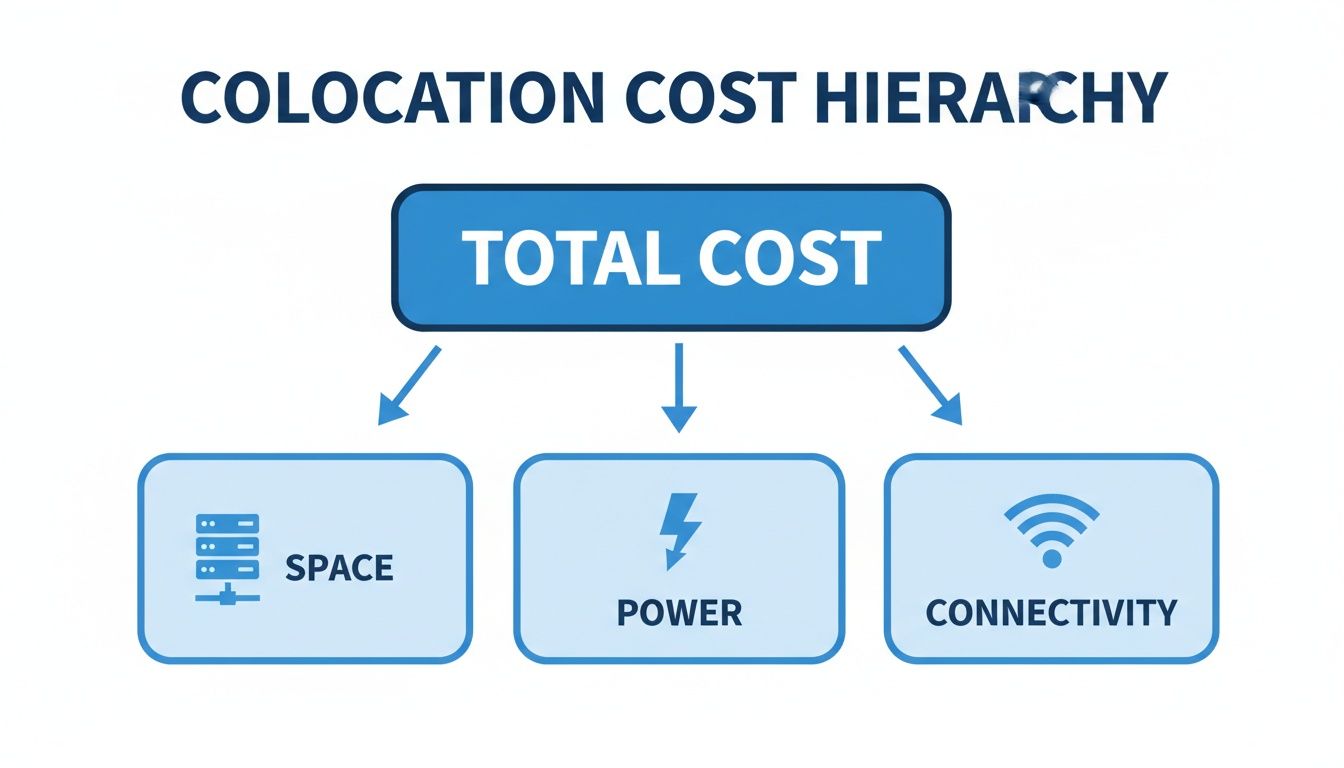
This breakdown shows that while space is the box your hardware lives in, it's really the ongoing operational costs—power and networking—that often drive the bulk of your monthly spend.
Space: The Physical Footprint
First and foremost, you’re paying for the physical real estate your equipment takes up. It’s not so different from renting a highly secure, climate-controlled storage unit, but for your servers. How much space you need comes down to your current hardware footprint and what you expect for future growth.
Providers typically sell space in a few standard sizes:
-
Per 'U': A "U" is a standard unit of measurement in a server rack, equal to 1.75 inches of vertical height. If you just need to rack a single firewall or a couple of small web servers, buying space by the 'U' is the most economical way to get started.
-
Quarter or Half Rack: Got a handful of servers? A partial rack gives you a dedicated spot without the cost of a full one. A quarter rack typically offers about 10U of space, while a half rack gets you around 20U—plenty for a small server cluster.
-
Full Cabinet: For businesses with a serious amount of infrastructure, a full cabinet (usually 42U to 48U) is the way to go. It’s a private, locked enclosure for all your gear, and it’s the standard for any established company running multiple critical applications.
Here’s a practical example: Imagine a startup launching a new mobile app. They might begin with a simple 2U contract for their main app and database servers. As their user base explodes, they can easily upgrade to a quarter rack to add more computing power and a dedicated backup server. Their physical footprint scales right alongside their business needs.
Power: The Engine of Your Infrastructure
Power is, without a doubt, one of the most crucial—and often largest—components of your colocation bill. We're not just talking about keeping the lights on. We’re talking about clean, stable, and uninterrupted electricity for your mission-critical hardware. How you’re billed for that power can make a big difference.
You’ll usually run into two main billing models:
-
Metered Power: This is essentially a "pay-as-you-go" plan. The data center measures the actual electricity your equipment draws in kilowatts (kW) and bills you for exactly what you used. It's a great fit for businesses with workloads that spike and dip, since you aren't paying for power you don't use.
-
Unmetered (Circuit-Based) Power: With this model, you pay a predictable flat fee each month for a circuit of a certain size (like a 20-amp or 30-amp circuit). You can draw as much power as you want up to that circuit's limit. This predictability is fantastic for budgeting.
Practical Example: A video rendering company might prefer a metered plan. Their servers run at 100% capacity during big projects, consuming lots of power, but are nearly idle between jobs. Metered billing saves them money during quiet periods. In contrast, an e-commerce site with steady, predictable traffic might choose an unmetered circuit for its consistent monthly cost, making financial forecasting easier.
The kind of work you’re doing directly impacts how much power you'll need. A standard web server sips power pretty modestly. But a server farm crunching complex AI or machine learning models? That requires high-density power, which costs more. Those high-performance servers throw off a lot more heat and drink electricity, making power the dominant cost factor for any serious computing operation.
Bandwidth: Your Connection to the World
Your servers aren’t much good if they can’t talk to anyone. Bandwidth is the digital highway connecting your infrastructure to your customers and team. The type and amount of data transfer you need will be a major line item on your monthly bill.
There are generally two flavors of connectivity to choose from:
-
Blended Internet: Picture a multi-lane highway built by combining roads from several different construction companies. The data center blends bandwidth from multiple internet carriers into one resilient connection. If one carrier has a problem, your traffic automatically finds another route. It’s a reliable and cost-effective choice for most businesses.
-
Dedicated Internet Access (DIA): This is your own private, express lane on the highway. You get a direct, uncontended connection from a single carrier. It costs more, but it guarantees performance. DIA is a must-have for applications where every millisecond counts, like financial trading platforms or VoIP services.
The choice really comes down to a classic trade-off: cost versus guaranteed performance. Blended internet is more than enough for many, but for those mission-critical workloads, a dedicated line is a worthwhile investment.
Remote Hands: Your On-Site IT Team
Unless your office happens to be right next to the data center, you can't just run over to reboot a server or swap a cable. That's where "remote hands" services are a lifesaver. This service gives you access to the facility's on-site technicians to handle physical tasks for you.
Practical Example: An application server becomes unresponsive at 2 AM. Instead of waking up an on-call engineer and having them drive an hour to the data center, you can submit a remote hands ticket. An on-site technician can power cycle the server within minutes, potentially saving hours of costly downtime and employee overtime.
Some common remote hands requests include:
-
Power cycling a server that’s frozen.
-
Plugging in a console cable so you can diagnose an issue remotely.
-
Swapping out a faulty hard drive or stick of RAM.
-
Labeling equipment and sending you a photo for verification.
This service is usually billed in one of two ways: either a small monthly retainer that includes a few hours of work or a simple per-incident fee. For any company that takes uptime seriously, it's an absolutely essential and incredibly cost-effective part of the colocation package.
Uncovering Hidden Colocation Costs
Your monthly colocation invoice is just the starting point. It covers the predictable, recurring costs like space and power, but it doesn't paint the whole financial picture. Think of it like buying a house—the mortgage is the main payment, but you also have property taxes, insurance, and maintenance. Similarly, a smart colocation budget needs to account for the expenses that exist outside the regular billing cycle.
These aren't "hidden" costs in a deceptive sense; they're simply part of the total investment required to build a resilient and reliable infrastructure. By getting ahead of them, you can craft a comprehensive budget that truly reflects your Total Cost of Ownership (TCO) and avoid any nasty financial surprises.
One-Time Setup and Migration Fees
Before your servers can get to work in their new home, you'll face some initial, one-off costs. Consider these the "move-in" fees for your critical hardware. Most providers charge a one-time fee to cover the physical labor of installing your cabinet, running the power circuits, and patching in your first network ports.
But the provider's fee is only one piece of the puzzle. You also need to budget for the physical migration itself. This often includes:
-
Professional Services: Hiring specialized IT movers who know how to securely pack, transport, and re-rack sensitive, expensive equipment.
-
Downtime Costs: Every minute your systems are offline during the move can translate to lost revenue. Meticulous planning is key to shrinking this window as much as possible.
-
Staff Time: The hours your own team dedicates to planning the logistics, overseeing the move, and validating that everything is working perfectly post-migration.
To put it in perspective, a mid-sized e-commerce business moving a single, full cabinet might budget anywhere from $3,000 to $7,000 for the physical move and initial data center setup. This is entirely separate from their first monthly colocation payment.
The Price of Uptime and Security
Not all colocation services are built the same, and the level of resilience you need has a direct impact on your costs. These aren't just optional add-ons; they're fundamental investments in business continuity.
A Service Level Agreement (SLA) is the data center's contractual promise of uptime. A standard SLA might guarantee 99.9% availability, which sounds great. But for a mission-critical application where every second of downtime costs you money and customer trust, you'll want to invest in a much tighter 99.99% or even 99.999% SLA.
Practical Example: For an online retailer, a standard 99.9% SLA allows for up to 43 minutes of downtime per month. If a major outage occurs during a peak sales event, that could translate to tens of thousands of dollars in lost revenue. Paying extra for a 99.999% SLA, which reduces potential downtime to just 26 seconds per month, is a sound business decision. It's an insurance policy for your revenue.
Security services are another critical layer. Things like managed firewalls and advanced DDoS mitigation are no longer optional in a world of constant cyber threats. While they add to the monthly bill, their value is priceless when an attack hits. You can learn more about how enterprise-grade DDoS protection works to keep you online when it matters most.
The Cost of Compliance
For any business operating in a regulated industry, compliance isn't a choice—it's a license to operate. Adhering to standards like HIPAA for healthcare or PCI DSS for payment processing adds a significant layer to your colocation costs.
So, why does compliance cost more?
-
Audited Facilities: Providers spend a great deal of money and effort on rigorous, third-party audits to certify that their facilities meet strict security and operational standards.
-
Enhanced Security: Compliance often requires physical security measures like private cages, biometric access controls, and detailed activity logging, all of which come at a premium.
-
Specialized Support: The data center staff needs to be trained to understand and support the specific needs of compliant environments.
A healthcare provider, for instance, can't just pick any data center; they must choose a HIPAA-compliant facility. This immediately narrows their options to premium providers who have made the necessary investments, which naturally results in a higher base cost for their colocation services. Factoring these compliance-driven expenses in from the start is essential for building a realistic budget.
How Location Drives Your Colocation Bill
Ever wonder why a full server rack in Northern Virginia costs a small fortune, while the exact same setup in a smaller city is significantly cheaper? It's a question that gets to the heart of colocation pricing: geography. The physical location of your data center is one of the biggest—and most frequently underestimated—factors that will shape your final invoice.
This isn't just random price-gouging. It’s all about local economics, much like the real estate market. An office in downtown Manhattan costs more than one in the suburbs for a reason—demand, resources, and accessibility. The same logic applies directly to data centers.
A few key local factors have a direct impact on your pricing:
-
Cost of Power: Data centers are incredibly power-hungry. If a facility is located in a region with access to cheap, plentiful energy, those savings are often passed right on to you. A market with low industrial electricity rates is almost always going to offer better power pricing.
-
Real Estate Prices: These are enormous, specialized buildings. The price of land and construction in a major metro hub is astronomical, and that overhead gets baked into the cost of your rack space.
-
Network Proximity: Major data center hubs cluster around the internet's superhighways—dense networks of fiber optics and major internet exchange points (IXPs). Being close to the action means better connectivity and lower latency, but you pay a premium for that prime digital real estate.
The Squeeze of Market Demand
Right now, the demand for data center capacity is through the roof, mostly thanks to the explosive growth of AI and the massive cloud providers. This has kicked off a fierce competition for space and power in top-tier markets, causing availability to shrink and prices to climb.
It’s a classic case of supply and demand. The global weighted average vacancy rate for data centers plunged a steep 2.1 percentage points year-over-year in Q1 2025, reaching a record low of just 6.6%. This supply crunch is hitting businesses in the wallet, with asking rents for colocation jumping 15-25% in core markets like Northern Virginia and Singapore in the last year alone. Power is also becoming a bottleneck. In Singapore, for instance, operators are scrambling for an additional 300MW of grid allowance, pushing customers to look at secondary markets where costs can be 20-30% lower. You can dig into the details in the global data center trends report from CBRE.
Playing the Map: Choosing Your Location Wisely
This price gap creates a crucial strategic decision for your business. Do you shell out top dollar for a spot in a primary hub, or could you find significant savings by setting up shop in a less crowded secondary market?
Practical Example: Let's say a SaaS company in New York City needs to launch a new server cluster. They could opt for a data center across the river in New Jersey—a primary market—to get the absolute lowest latency for Wall Street clients. But what if their app serves a national audience and can tolerate a few extra milliseconds of delay? In that case, placing their gear in a market like Dallas might be a much smarter move.
By picking a secondary hub, they could easily slash 20% or more from their monthly space and power bill. It’s a trade-off, balancing raw performance against the budget. That freed-up cash could then be poured back into developing new features or marketing. Exploring well-connected but less saturated markets can be a fantastic financial play. For instance, you can learn more about the cost and connectivity benefits of colocation services in Dallas, Texas. Your location strategy shouldn't be an afterthought; it should be a deliberate choice that lines up with your performance needs and financial goals.
Calculating Your True Total Cost of Ownership
To really get a handle on the cost of colocation, you have to look past the monthly invoice. The real financial picture only comes into focus when you calculate the Total Cost of Ownership (TCO), which is a fancy way of saying you account for every single expense—direct and indirect—tied to your infrastructure over its entire life. This includes all those "soft" costs that never show up on a bill but absolutely hit your budget.
Think about it. How many hours does your IT team sink into managing an on-premise server room? Every minute spent fiddling with cooling systems, tracing power circuits, or dealing with physical security is a real operational cost. Then there are the travel expenses for on-site visits, the capital you've frozen in UPS systems and generators, and maybe the biggest cost of all: having your best engineers babysitting a server room instead of driving your business forward.

Taking this holistic view is crucial. It lets you build a powerful business case, compare your options honestly, and truly justify the investment. The conversation shifts from, "How much is the monthly fee?" to a much more strategic question: "What's the smartest, most cost-effective way to run our mission-critical applications?"
On-Premise vs. Colocation TCO
Nothing illustrates the value of colocation better than a direct, head-to-head comparison. Let’s break down what it really costs to run a small server environment in-house versus placing it in a colocation facility.
Here's a hypothetical look at the TCO over a three-year period, which is a pretty standard planning horizon for this kind of infrastructure.
TCO Comparison: On-Premise Data Center vs. Colocation (3-Year Estimate)
| Cost Category | On-Premise Data Center | Colocation Facility | Key Savings |
|---|---|---|---|
| Capital Expenses (CapEx) | $125,000+ | $0 | You completely sidestep the massive upfront investment in construction, UPS, HVAC, and fire suppression systems. |
| Operational Expenses (OpEx) | $90,000 ($2,500/mo) | $72,000 ($2,000/mo) | Your costs become lower and more predictable, bundling power, cooling, and security into a single monthly payment. |
| IT Staff & Labor | $60,000 (Partial FTE) | $5,400 (Remote Hands) | You free up your internal IT team from tedious facility management, letting them focus on projects that actually grow the business. |
| Connectivity & Bandwidth | $54,000 ($1,500/mo) | $36,000 ($1,000/mo) | Tapping into a data center's blended, carrier-neutral bandwidth at wholesale rates is almost always cheaper than buying a dedicated circuit yourself. |
| Total 3-Year TCO | $329,000+ | $113,400 | A potential 65%+ reduction in TCO by shifting from huge capital outlays to manageable operational expenses. |
Disclaimer: These numbers are just estimates. Your actual costs will vary based on your specific needs, hardware, and location.
As the table shows, the numbers don't lie. The immediate CapEx savings are often what get people’s attention, but the long-term operational and staffing efficiencies are where the real strategic value is unlocked.
Your Return on Investment
The TCO analysis makes the huge capital savings crystal clear. This value is being recognized globally; while North America is the biggest market, Asia-Pacific is catching up fast. In fact, research projects the US colocation market will explode from USD 25.60 billion in 2025 to USD 73.89 billion by 2034.
By moving to colocation, companies avoid the staggering construction costs of $200-$500 per square foot and immediately gain access to infrastructure with built-in Tier III uptime of 99.982%. You can learn more about the strategic choices in the global colocation market and see how other businesses are taking advantage of this shift.
The Return on Investment (ROI) from colocation is about so much more than just the money you save. The true ROI comes from the strategic advantages: superior uptime, massively improved security, and the priceless freedom to point your best tech minds at revenue-generating innovation.
At the end of the day, colocation is about transforming your infrastructure from a capital-draining cost center into a lean, scalable operational expense. And if you're also thinking about what hardware to put in that new space, our guide on dedicated servers prices can help you budget for the equipment. This complete financial picture gives you the clarity to make a smart decision that supports both your technology and your bottom line.
Smart Ways to Keep Your Colocation Costs in Check
Knowing what goes into your colocation bill is one thing; actually controlling it is another. The good news is that trimming your monthly spend doesn't mean you have to compromise on performance or reliability. It’s all about making smart choices to get the most value from your contract and steer clear of costs you simply don't need.
Think of colocation less as a fixed, unchangeable utility bill and more as a flexible resource you can mold to your actual business requirements. By being strategic from the start and taking the time to review your setup periodically, you can make your colocation a lean, efficient powerhouse for your operations.
Get Your Sizing Right from the Start
Probably the biggest budget-killer we see is businesses paying for space and power they aren’t using. It’s easy to get caught up in planning for some far-off future, but that habit leads to immediate waste.
-
Space: If you only need half a rack, don't pay for a full cabinet. Start with what you need today, but make sure your provider has a straightforward path for you to scale up when the time comes.
-
Power: Your provider should be a partner in helping you accurately estimate your power draw. If your usage goes up and down, a metered power plan can be a lifesaver, as you’ll only be billed for the electricity you actually pull.
-
Bandwidth: Resist the urge to overbuy your internet connection. Most good providers offer burstable billing options, like the 95th percentile method. This gives you the headroom for occasional traffic spikes without locking you into a pricey, higher commitment tier you don't need most of the time.
Negotiate with the Long-Term in Mind
Remember, your colocation contract isn't set in stone—it's a negotiation. Data center providers want stable, long-term clients and are usually willing to offer some pretty attractive discounts for a longer commitment.
Locking in a multi-year contract can easily shave 10-20% or more off your monthly costs compared to a standard one-year term. It also gives you predictable budgeting and shields you from price hikes in hot markets.
Committing to a longer term shows the provider you're serious, and they'll often invest back into that relationship with better pricing.
Audit and Clean Up Your Connections
It's amazing how quickly unused services can pile up on an invoice. Cross-connects are a classic example. Maybe it’s a link to a carrier you trialed but never adopted, or a connection to a partner you no longer work with. These "phantom costs" can linger for years if you don't look for them.
Make it a habit to schedule an annual audit of all your cross-connects and bandwidth circuits. We've seen companies find they're still paying $150/month for a cross-connect to a service they shut down a year prior. Axing that one connection saves $1,800 a year. It's simple math, but it adds up.
Another pro tip: look into your provider's blended bandwidth. It's often much more cost-effective than buying a dedicated circuit from a single carrier, and it gives you built-in redundancy at a better price.
A Few Common Questions About Colocation Costs
Diving into the numbers on colocation can bring up some specific questions. Let's tackle a few of the most common ones head-on to give you a clearer picture of what to expect when budgeting for your infrastructure.
Is Colocation Really Cheaper Than the Cloud for Predictable Workloads?
It often is, and sometimes by a significant margin. For businesses with steady, predictable computing needs, colocation almost always wins the long-term cost battle against the public cloud.
Cloud platforms are fantastic for handling wild swings in demand, but that flexibility comes at a price. Their pay-as-you-go model can turn into a financial headache when your resource consumption is consistent. With colocation, you swap that unpredictable operational expense (OpEx) for a much more stable one. You own the hardware, so you're not paying the markup that cloud providers bake into every virtual server and gigabyte of storage.
Practical Example: A SaaS company running a database that constantly pulls 10kW of power and uses a 10Gbps connection would see their cloud bill climb and climb. In a colocation facility, they’d pay a flat, predictable fee for those exact resources, unlocking huge savings over a two or three-year contract.
What Are the Standard Contract Lengths, and How Do They Affect My Price?
You'll typically see contracts ranging from one to five years. This is one of your biggest negotiating levers—the longer you commit, the better your monthly rate will be. A longer contract gives the data center provider stability, and they'll pass those savings on to you.
-
1-Year Term: This gives you the most flexibility but will also have the highest monthly price tag.
-
3-Year Term: The sweet spot for many businesses. It strikes a great balance between commitment and savings, often knocking 10-15% off the monthly rate compared to a one-year deal.
-
5-Year Term: This option locks in the absolute best monthly price, protecting your budget from market rate hikes for half a decade.
Opting for a longer term is a smart strategic play to fix your costs and make your infrastructure budget incredibly predictable.
How Much Should I Budget for the Initial Setup and Migration?
Don't forget about the one-time costs to get everything up and running. Beyond your first monthly invoice, you'll have setup and migration expenses to cover.
The provider's setup fee, which usually covers the installation of your rack and power circuits, typically lands somewhere between $500 and $2,000.
The real variable, though, is the cost of physically moving your servers. This involves more than just unplugging and replugging. You might need specialized IT movers, transit insurance, and, most importantly, the time of your own technical team to plan and oversee the whole process. For a small or medium-sized deployment, like a single full rack, it’s a good idea to budget between $3,000 and $7,000 to get from your old setup to your new one, fully tested and online.
Ready to calculate the true cost of colocation for your mission-critical infrastructure? At Soraxus, we provide transparent pricing on our enterprise-grade colocation services, featuring A+B power, 24/7 remote hands, and global DDoS mitigation to ensure your business stays online and secure. Get a custom colocation quote today.