Best Colocation Providers How to Choose the Right Partner

Soraxus Assistant
January 13, 2026 • 24 min read

Picking a colocation provider is about more than just finding a home for your servers. It’s about finding a partner who can guarantee rock-solid uptime, deliver top-tier security, and provide an infrastructure that scales with you—all without the staggering expense of building out your own data center. It's the smart play for any business that needs to keep full control over its hardware but also wants the reliability of an enterprise-grade facility. This guide will walk you through how to evaluate providers on the criteria that actually matter for mission-critical applications.
Why Choosing the Right Colocation Provider Is a Critical Business Decision

Let's be clear: choosing a colocation partner isn't just an IT decision. It's a foundational move that directly impacts your company's growth and resilience. For many organizations, the on-premise data center eventually becomes a bottleneck. The constant capital drain for power, cooling, and physical security—not to mention the operational headache of maintenance and staffing—siphons resources away from what your business actually does.
On the flip side, the public cloud isn’t always the answer. While it offers flexibility, it can fall short for businesses with specific needs. If you require full control over custom hardware, need predictable costs for heavy workloads, or have to meet strict compliance standards, the cloud’s shared model often feels too restrictive. This is exactly where colocation shines as the perfect middle ground.
Bridging the Gap Between Control and Cost
Colocation really does offer the best of both worlds. You keep total ownership and control of your servers and network hardware, but you get to house them in a facility built from the ground up for maximum security and uptime.
This model is a game-changer for:
- Mission-Critical Applications: Any platform where even a minute of downtime costs you money and customer trust. For example, a fintech application processing real-time transactions demands 99.99% or higher uptime.
- SaaS Platforms: Companies that depend on robust DDoS protection and low-latency connections to keep their user experience snappy and reliable worldwide. A project management tool, for instance, must feel instantaneous for users across different continents.
- High-Performance Gaming: Online communities that need powerful, dedicated hardware and finely tuned network routes to deliver a competitive, lag-free experience.
The market backs this up. The global data center colocation market is expected to jump from USD 104.2 billion in 2025 to a massive USD 204.4 billion by 2030. This growth is fueled by the explosive demand for AI and high-performance computing, which simply can't run effectively on generic infrastructure. You can discover more insights about these market projections on marketsandmarkets.com.
Key Evaluation Criteria for Top Providers
To find the right partner, you need a solid framework for evaluation. Here's a breakdown of the non-negotiables that separate the premier providers from the rest of the pack.
| Evaluation Pillar | Why It's Critical for Your Business |
|---|---|
| Uptime & SLA | This is your availability guarantee. It directly impacts your revenue and reputation. |
| Security & Compliance | Protects your assets from both physical and digital threats while ensuring you meet industry regulations. |
| Connectivity & Latency | Ensures a fast, reliable experience for your end-users. Absolutely crucial for SaaS and gaming. |
| Support & Remote Hands | This is your on-site expert help. It saves you immense time, travel, and operational costs. |
The Core Framework for Evaluating Colocation Services
Choosing the right colocation provider means cutting through the marketing noise and digging into the technical specs that actually matter to your business. A real, apples-to-apples comparison rests on a handful of non-negotiable pillars—the bedrock of any quality service.
Each of these pillars represents a crucial aspect of performance, security, and reliability. Whether you're running a high-frequency trading platform or a global SaaS application, knowing what to look for is the first step toward a smart decision.
Uptime and Service Level Agreements
At its core, a colocation provider’s most fundamental promise is availability. This is spelled out in the Service Level Agreement (SLA), which contractually guarantees a specific percentage of uptime. While many providers throw around a 99.9% uptime SLA, the difference between that and 99.99% is staggering when you do the math.
- 99.9% Uptime: Allows for up to 8.77 hours of downtime per year.
- 99.99% Uptime: Allows for only 52.6 minutes of downtime per year.
For an e-commerce site, those eight hours could easily translate into millions in lost revenue during a Black Friday sale. For a financial services firm, even a few minutes of outage can shatter customer trust. Don't just look at the percentage; scrutinize the SLA for what happens—and what remedies are offered—if they fail to meet that guarantee.
Power and Cooling Redundancy
A data center’s uptime promise is only as good as its power and cooling infrastructure. Redundancy is everything. It ensures that a single point of failure won't take your entire rack offline. The undisputed gold standard here is an A+B power configuration, where your equipment gets power from two completely independent sources.
Think about a healthcare application that processes critical patient records—it simply cannot go down. If the "A" power feed fails from a utility outage or an internal issue, the "B" feed instantly picks up the slack with zero disruption. For any mission-critical workload, this level of resilience isn't a luxury; it's a requirement.
Network Connectivity and Latency
Your application's performance is directly hitched to the provider's network. This is why a carrier-neutral facility is so important. It gives you the freedom to choose from a whole menu of internet service providers, which naturally creates competition and leads to better pricing and performance for you.
A global gaming platform's success lives and dies by latency—the slightest delay in data transmission. By choosing a provider with diverse, low-latency network routes and direct peering with major carriers, they can deliver a smooth, competitive experience for players, no matter where they are.
Always look for providers offering blended bandwidth from multiple Tier 1 carriers. This is your best defense against network-specific outages and ensures your traffic is always taking the most efficient path.
Advanced DDoS Protection
In today's world, a Distributed Denial of Service (DDoS) attack isn't a possibility; it's an inevitability. Basic firewall protection just doesn't cut it anymore. Top-tier colocation providers offer advanced, always-on DDoS mitigation capable of scrubbing malicious traffic at multiple layers of the network stack (Layers 3-7).
Imagine a SaaS company launching a new product. A sophisticated application-layer (Layer 7) attack could target specific functions of their platform, making it unusable for customers even if the network is technically online. A smart mitigation system can spot and neutralize this kind of attack in seconds, keeping the service available.
Remote Hands and Management Access
Your team can't be at the data center 24/7. That's where remote hands services come in. These are the provider's expert technicians acting as your hands on-site, ready to perform tasks like rebooting servers, swapping out a failed drive, or checking a cable connection at any time of day or night. This service is a genuine lifeline for managing infrastructure from afar.
Equally critical is out-of-band (OOB) management, which gives you a secure, secondary connection to your hardware. If a server goes dark on the main network, OOB access lets your engineers troubleshoot and restore it as if they were standing right in front of it, slashing resolution times. When you analyze the total financial impact, these features add immense value; you can learn more about the overall cost of colocation to see how services like remote hands fit into the bigger picture.
A Practical Framework for Comparing Provider Features
Putting theory into practice is where a good evaluation really starts to matter. To find the right colocation partner, you have to dig deeper than the marketing slicks and compare the features that actually impact your business. It's the small, nuanced differences in service offerings that often translate into huge gaps in performance, security, and day-to-day operations.
Let's look at how to compare providers by creating a few typical profiles. This approach makes it much clearer what you get at different price points and why a more specialized provider might be a strategic investment rather than just a cost.
This decision tree helps visualize how your application's core needs should point you toward either a performance-focused or a mission-critical colocation service.
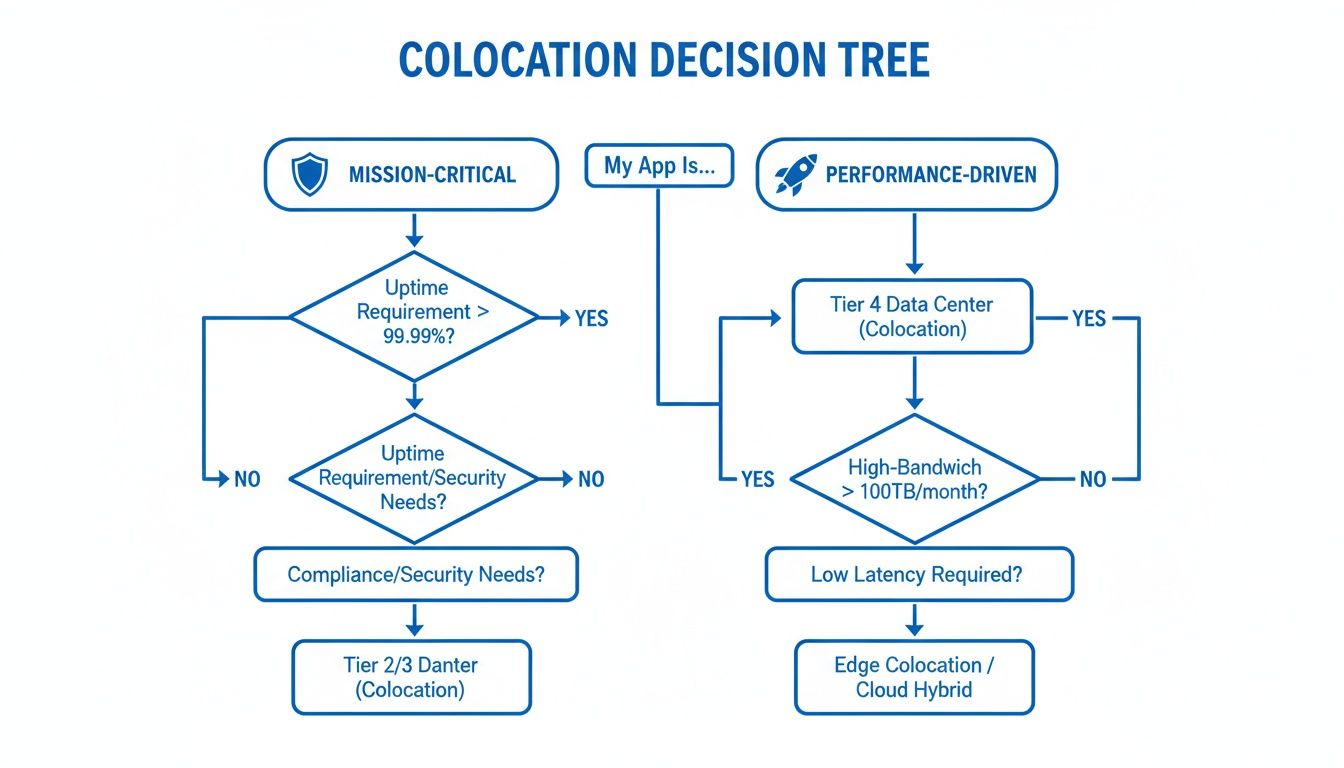
The main takeaway here is simple: your primary business driver should dictate your evaluation. Whether it's the bulletproof reliability needed for a fintech platform or the raw speed required for a gaming service, that's your starting point.
Sample Colocation Provider Feature Comparison
To see how this works in the real world, let's compare three common provider types. This table isn't about specific brands but about illustrating the kind of service you can expect at different tiers. It helps you map your own needs to the provider profile that makes the most sense.
| Feature | Typical Budget Provider | Standard Enterprise Provider | High-Performance Provider |
|---|---|---|---|
| Uptime SLA | 99.9% (up to 8.77 hours of annual downtime) | 99.99% (up to 52.6 minutes of annual downtime) | 100% (backed by N+1 or 2N redundancy) |
| DDoS Protection | Basic network-level (Layers 3/4), often with extra fees | Multi-layered (Layers 3-7), usually included | Advanced, always-on mitigation with sub-second response and application-specific rules |
| Power Redundancy | N+1 on some systems, but may have single points of failure | N+1 or 2N on critical infrastructure (power/cooling) | 2N end-to-end redundancy on all systems (UPS, PDUs, generators) |
| Remote Hands / OOB | Basic remote hands (ticket-based), limited OOB access | Comprehensive remote hands, basic OOB access | Full out-of-band (OOB) management with root access, plus skilled remote hands |
| Hardware Options | Limited to specific brands or models; BYOH often restricted | Broad support for customer-owned hardware (BYOH) | Optimized for high-density, power-intensive hardware (GPUs, FPGAs) |
| Connectivity | Limited carrier selection, higher latency to major exchanges | Carrier-neutral with good peering and major network access | Blended, multi-homed BGP network with direct, low-latency routes to key exchanges |
Looking at the features side-by-side, it becomes obvious that not all colocation is created equal. A budget provider might be fine for a simple dev environment, but for anything revenue-generating or performance-sensitive, the limitations in uptime, security, and remote management become serious business risks.
Deconstructing the Uptime SLA
The Service Level Agreement (SLA) is often the first thing people look at, but that headline number hides the real story. A provider offering a 99.9% uptime SLA is promising something fundamentally different from one guaranteeing 99.99%.
The business impact is massive. That 99.9% figure allows for almost nine hours of downtime a year—totally unacceptable for any serious online business. In stark contrast, a 99.99% SLA cuts that potential downtime to just over 52 minutes annually. For an e-commerce site, that's the difference between a minor hiccup and losing a catastrophic amount of money on Black Friday.
Differentiating DDoS Mitigation Capabilities
DDoS protection is another area where the details are critical. A budget provider might offer basic, network-level (Layer 3) protection that can handle simple volumetric attacks. That's a start, but it leaves your applications wide open to more sophisticated threats.
True enterprise-grade providers offer advanced protection that covers Layers 3 through 7. This is absolutely essential for stopping application-layer attacks that target specific functions of your software, like a login form or an API endpoint.
For a SaaS platform, an advanced Layer 7 attack can make the application completely unusable for customers, even if the servers are technically still online. Comprehensive DDoS mitigation detects and scrubs this malicious traffic in near real-time, ensuring the user experience is never compromised.
This level of security is non-negotiable for any business whose reputation is built on availability.
Control and Access for Technical Teams
For your DevOps and network engineering teams, the degree of control they have is a major factor. While most providers offer some kind of remote support, the best ones empower your team with tools for fast, independent troubleshooting.
One of the most valuable features you can get is out-of-band (OOB) management with full root access. This gives you a secure, secondary connection directly to your hardware that’s completely separate from your primary data network. If a server goes offline because of a bad config file or an OS crash, your engineer can use OOB to log in, fix the problem, and reboot the machine—all without ever filing a support ticket.
This direct control slashes resolution times and gives your technical teams the autonomy they need. When you’re evaluating options, exploring high-performance colocation services that include these features is a must for any agile team.
The market itself is telling a story. North America's colocation market is projected to skyrocket from USD 37.00 billion in 2023 to USD 252.10 billion by 2034, driven by the intense demands of AI, hybrid cloud, and other high-performance workloads. This growth highlights just how important it is to partner with a provider built for enterprise-grade reliability and deep technical capability. This rapid expansion, combined with shrinking vacancy rates worldwide, makes a detailed feature-by-feature comparison more crucial than ever.
How Top Companies Leverage Colocation for Success
It’s one thing to read a spec sheet, but it’s another to see how those technical features solve real, pressing business problems. The best colocation providers aren't just renting out rack space. They're providing the rock-solid infrastructure that fuels growth, protects revenue, and builds customer trust.
Let's walk through three common scenarios where colocation becomes the winning move. Each example shows how specific features solve a critical business need, helping you connect the dots back to your own goals.
Use Case 1: The Growing SaaS Company
Picture a rapidly scaling Software-as-a-Service (SaaS) company. They're facing two huge challenges at once: their platform absolutely must stay online to keep subscribers happy, and it has to fend off increasingly sophisticated cyberattacks. Their on-premise gear is groaning under the pressure, but the public cloud doesn't give their DevOps team the granular control they need.
The Solution: This company finds a colocation partner that nails two key features.
- A 99.99% Uptime SLA: This isn't just a number on a page. It’s a promise backed by A+B power redundancy and resilient cooling, meaning a single point of failure in the facility won't take their servers offline. It delivers the always-on availability their customers demand.
- Advanced DDoS Protection: They opt for a provider with always-on Layer 3-7 DDoS mitigation. This service automatically detects and scrubs everything from simple volumetric floods to tricky application-layer attacks, ensuring their platform stays reachable even when under fire.
By handing off infrastructure reliability and security to a specialist, the SaaS company frees up its own team to focus on what they do best: building a great product and winning new customers.
Use Case 2: The Competitive Game Hosting Provider
For a game hosting provider, success is literally measured in milliseconds. Latency is the ultimate villain, and a laggy experience is a death sentence in the cutthroat gaming market. They need to provide a lightning-fast connection to a global player base, but building that kind of network from scratch is astronomically expensive.
The Solution: They partner with a colocation provider that lives and breathes networking.
- Global Network Peering: The provider has direct, low-latency connections to major internet exchanges and Tier 1 carriers. This means player traffic gets the most efficient, direct route possible, which is key to crushing ping times.
- Multiple Facility Locations: By placing servers in data centers across key gaming hubs like North America, Europe, and Asia, they bring the game instances physically closer to their players. The result is a dramatic drop in lag and a much better gameplay experience.
This strategic approach to colocation gives them a massive competitive advantage that a single, centralized data center could never match.
Use Case 3: The Efficient Managed Service Provider
A Managed Service Provider (MSP) is juggling the IT infrastructure for dozens of clients, each with their own specific hardware and compliance rules. They need a secure, reliable home for all that client gear without the headache and cost of running their own data center. Most importantly, they need to perform remote maintenance tasks fast to meet their own SLAs.
For an MSP, time is money. Every minute spent waiting for on-site support is a minute they can't bill and a potential hit to their client's satisfaction. Responsive, skilled remote hands are not a convenience—they are a core operational requirement.
The Solution: The MSP finds a provider that essentially becomes an extension of their own tech team.
- Responsive Remote Hands: They gain 24/7 access to skilled technicians who can handle tasks like rebooting servers, swapping components, and managing cables. A guaranteed response time means they can solve client issues quickly without ever setting foot in the facility.
- Secure, Compliant Environment: The data center holds key certifications (like SOC 2) and has robust physical security. This allows the MSP to confidently serve clients in highly regulated industries like healthcare and finance, knowing their data is protected.
This partnership lets the MSP deliver enterprise-grade hosting to its clients without the massive capital investment, creating a far more scalable and profitable business model.
Your Essential Colocation RFP and Migration Checklist
Moving your infrastructure to a colocation facility is a major undertaking. It demands careful planning, from how you first vet potential partners to the final, nerve-wracking server migration. A solid Request for Proposal (RFP) is your best tool here; it forces the conversation past slick marketing and into the technical nitty-gritty that actually matters.
Once you’ve picked a winner, the real work begins. A detailed migration plan is non-negotiable if you want to keep downtime to a minimum and avoid a chaotic cutover. This section breaks down both phases, giving you a practical checklist to get from evaluation to a successful launch.
Key Questions for Your Colocation RFP
Your RFP needs to be a direct reflection of your business's technical and operational requirements. Don't just download a generic template. The goal is to build a questionnaire that compels providers to give you concrete, comparable answers about the features that will make or break your deployment.
Here are some must-ask questions, organized by the evaluation criteria we’ve already covered:
-
Network and Connectivity
- Can you provide a complete list of on-net carriers currently active in the facility?
- What is your total network capacity, and what is the current utilization percentage?
- Describe your DDoS mitigation services. What is the total mitigation capacity in Tbit/s, and is Layer 7 protection a standard inclusion?
- What is your average time-to-mitigate for a newly detected DDoS attack?
-
Power and Redundancy
- Is your power delivery a true A+B feed, from the utility entrance all the way to the rack PDUs?
- What is the N+ rating for your UPS systems and your cooling infrastructure?
- Can you provide the documentation from your last five generator and UPS load tests?
-
Support and Security
- What is the guaranteed response time for remote hands requests? Do you offer different service tiers?
- Which compliance certifications do you hold (e.g., SOC 2 Type II, ISO 27001)? More importantly, can you provide the attestation reports?
- Walk me through your physical security measures, including on-site staffing, access protocols, and surveillance coverage.
This kind of structured inquiry is what gets you the hard data you need to compare providers apples-to-apples. It turns a vague search for the "best" provider into a decision backed by facts.
A High-Level Migration Checklist
With a provider selected, your focus pivots to execution. A phased migration is the only sane way to manage the complexity and cut down on risk. While no two migrations are identical, this framework will help ensure nothing critical falls through the cracks. It's also worth noting that many businesses offload server management post-migration; looking into Linux managed services can be a smart move to free up your team for more strategic work.
Here is a simplified, four-phase checklist to guide your move:
-
Phase 1: Discovery and Planning
- Audit Current Infrastructure: Document every server, switch, and storage array. Note power draw, network connections, and physical dimensions.
- Map Dependencies: Figure out which applications and services rely on each other. This is crucial for planning the migration sequence and minimizing disruption.
- Define Success Metrics: Establish exactly what "working" means post-migration. Set clear testing criteria for performance, connectivity, and application function.
-
Phase 2: Pre-Migration Setup
- Rack and Stack: Get all the hardware installed and cabled in the new facility, either by the provider or your own team, following your detailed plan to the letter.
- Establish Connectivity: Set up and thoroughly test the new network links—both to the internet and any point-to-point circuits you need.
- Perform Initial Tests: Power on non-critical systems first. This lets you verify power, cooling, and basic network access before the big switch.
A common mistake is underestimating the time needed for physical logistics. A large-scale server move can involve specialized freight, insurance, and careful coordination. Plan for delays and build buffer time into your schedule to avoid a last-minute scramble.
-
Phase 3: The Cutover Event
- Final Data Sync: Just before the cutover, perform one last backup or data replication to the new hardware.
- Execute Network Changes: Update your DNS records and other network configurations to point all traffic to the new colocation environment. This is the moment of truth.
- Decommission Old Site: Once you’ve confirmed traffic is flowing smoothly to the new site, you can begin powering down the legacy infrastructure.
-
Phase 4: Post-Migration Validation
- Run a Full Test Suite: Go through your pre-defined success metrics, testing every single application and service to confirm full functionality.
- Monitor Performance: Keep a close eye on network latency, server utilization, and application response times for any anomalies.
- Update Documentation: Fully document the new environment—IP addressing, physical rack layout, support procedures, everything.
Why Performance-Focused Businesses Choose Soraxus
We've walked through the key criteria for choosing a colocation provider. Now, let's connect that framework to what we offer at Soraxus. For businesses where performance isn't just a goal but the entire foundation of their service, picking the right partner is a make-or-break decision. This is precisely the environment we were built for.
Our entire infrastructure was designed from the ground up to handle the intense demands of companies that can’t compromise on speed, security, or reliability. By looking at our services through the lens of the evaluation criteria, you can see how we provide a clear path for scaling your most important applications.
Uncompromising Uptime and Security
If you run a SaaS platform or an e-commerce store, you know that uptime is directly tied to revenue and customer trust. We tackle this head-on with a financially backed 99.99% uptime SLA. This isn't just a promise; it's supported by a true A+B power redundancy that runs from the utility grid all the way to your rack, eliminating single points of failure.
On the security front, our DDoS mitigation is always-on, with a global capacity of 1.5+ Tbit/s. This goes far beyond basic network filtering. Our system actively inspects and scrubs malicious traffic from Layers 3 through 7, protecting your applications from complex attacks that simpler systems would miss.
Think about a game hosting company. An application-layer attack can cripple their service and drive players away in minutes. Our multi-layered mitigation is designed to spot and neutralize these threats in under a second, keeping the user experience intact and protecting the company's reputation.
Empowering Technical Teams with Control
We know that DevOps teams, MSPs, and other technical experts need more than just space and power—they need genuine control. Soraxus provides a powerful toolkit built for efficiency and immediate response.
Every client gets full root access and dedicated out-of-band (OOB) management. This gives your engineers a secure, secondary channel to troubleshoot and manage hardware directly, even if the primary network is unavailable. It’s a critical tool that dramatically shortens resolution times.
This control is backed by our expert 24/7 support team, which maintains a 15-minute average response time. Whether you need a simple reboot or complex on-site diagnostics, our remote hands are a skilled extension of your own team. From gaming servers that need the lowest possible latency to enterprise applications that demand a resilient architecture, Soraxus delivers the performance-focused infrastructure that lets you scale with confidence.
Frequently Asked Questions About Colocation
Thinking about colocation often brings up a lot of questions. It's a big decision, so getting clear answers is key. Here are some of the most common things we get asked by businesses weighing their options.
What Is The Difference Between Colocation And Dedicated Servers?
The main distinction comes down to who owns the hardware. With colocation, you bring your own servers, firewalls, and other gear to a data center. You're essentially renting the space, power, cooling, and network connectivity for the equipment you already own.
On the other hand, with dedicated servers, you're renting the entire server from the provider. It's a simpler, quicker way to get up and running with standardized equipment, but you lose the fine-grained control that comes with owning the hardware. Colocation is really built for businesses that have very specific hardware needs or a long-term strategy for their infrastructure.
How Much Does Colocation Typically Cost?
There's no single price tag for colocation because the cost is directly tied to what you use. It almost always boils down to three core components:
- Rack Space: How much physical room does your equipment need? This is measured in rack units, or 'U'.
- Power Consumption: A significant part of the monthly bill is the electricity your hardware consumes.
- Bandwidth Usage: This covers the amount of data moving in and out of your servers over the provider's network.
A small setup with a single server might run a few hundred dollars a month, while a business needing several full racks could be looking at thousands.
It's absolutely crucial to get a detailed quote that breaks down every single line item. Ask about one-time setup fees and the cost for services like remote hands so you don't get hit with unexpected charges down the road.
What Security Measures Should I Look For In A Provider?
Great security is a two-part equation: physical and digital. On the physical side, you want to see a data center that's locked down tight. That means 24/7 on-site staff, multi-factor access controls (like biometrics), and constant video surveillance. Your hardware should be a fortress.
Digitally, network protection is non-negotiable. Look for providers that offer sophisticated, always-on DDoS mitigation capable of handling today’s massive attacks. Certifications like SOC 2 or ISO 27001 are also a huge plus, as they prove the provider's security and operational processes have been audited and verified by a third party.
Ready to house your critical infrastructure in a facility built for performance and security? Soraxus provides enterprise-grade colocation with a 99.99% uptime SLA, A+B power redundancy, and advanced DDoS mitigation to keep you online. Explore our colocation solutions.