What is out of band management? A Quick Guide to Remote Server Access

Soraxus Assistant
January 18, 2026 • 20 min read
Think of out-of-band management as a secret back door to your IT gear. It’s a completely separate, secure network channel used to access and control your infrastructure, totally independent of the main network your users and applications rely on.
This dedicated path ensures you can always reach your critical hardware—servers, switches, you name it—even when the primary network is completely down. It’s one of the cornerstones of any solid remote server recovery plan and a must-have for maintaining high availability.
A Lifeline for Your Infrastructure
Picture this: it's 3 AM, and a bad firewall rule or a crashed router just took your company’s primary network offline. Your servers are now digital islands, completely unreachable. This is precisely the kind of nightmare scenario where out-of-band management (OOBM) becomes your lifeline.
Think of it like an emergency service road running alongside a major highway. When a massive traffic jam (a network outage) brings everything to a halt, you can hop on the service road and bypass the chaos entirely. That’s what OOBM does—it gives you a direct, reliable route to your equipment, no matter what’s happening on the main network.
This "backdoor" access isn't just a simple backup plan; it's a fundamental part of modern infrastructure management. It provides direct, hardware-level control over your devices, completely independent of the operating system's status.
Why OOBM Is a Non-Negotiable Strategy
For any business running important applications, especially on bare metal servers or in colocation data centers, OOBM isn't just a nice-to-have. It’s absolutely essential. It’s the difference between a five-minute remote fix and an expensive, hours-long trip to a data center to physically push a button.
Out-of-band management lets IT teams do critical work from anywhere, like rebooting a frozen server, tweaking BIOS settings, or even reinstalling an entire operating system, all without ever touching the production network.
This capability is so critical that the OOBM market is booming. Valued at over $2 billion, it’s expected to more than double to $5.6 billion by 2033 as more businesses realize they need constant, reliable access to their hardware. You can dig into the numbers in this market research on OOBM growth.
To help you get a quick handle on these ideas, here’s a simple breakdown of the core concepts.
Key OOBM Concepts at a Glance
| Concept | Brief Explanation |
|---|---|
| Separate Network | Uses a dedicated physical or logical network, completely isolated from production traffic. |
| Hardware-Level Access | Connects directly to a device's management processor (like a BMC), not its OS. |
| Always-On | Provides access even if the device is powered off, crashed, or has no network connectivity. |
| Resilience | Ensures management capabilities are not affected by issues on the primary network. |
These principles are what make OOBM such a powerful tool for maintaining control over your infrastructure.
This kind of remote control is also incredibly valuable for organizations that rely on outside experts. For instance, a good managed service provider (MSP) can use OOBM to securely manage a client's infrastructure from anywhere on the globe. This enables them to respond to incidents instantly, 24/7, which drastically cuts down the Mean Time to Repair (MTTR) when things go wrong.
How OOBM Creates a Backdoor for Your Infrastructure
The magic of out-of-band management lies in one powerful idea: isolation. It carves out a completely separate, dedicated network used only for administration. This management network is physically or logically walled off from the everyday chaos of your main production network.
Why does that matter? It means that even if your primary network is down, under attack, or just hopelessly congested, your management channel stays wide open.
Think of it like a highway during rush hour. The main lanes—your production network—are jammed. But OOBM is like having your own private service road. It's clear, direct, and gets you straight to the essential controls, no matter how bad the main traffic gets.

This private path gives you a lifeline when things go wrong, a secure backdoor for direct access, and an independent way to connect when the front door is blocked.
The Hardware That Makes It Happen
This independent access isn't just a software trick; it's made possible by a few key pieces of hardware working in concert. Each one gives you a different kind of direct, physical control over your gear.
-
Baseboard Management Controller (BMC): This is the unsung hero of OOBM. The BMC is a small, self-contained computer living on your server's motherboard. It has its own processor, memory, and network port, running completely independently of the server's main CPU and operating system. It's the "brain" that lets you power cycle the machine, check temperatures, and even get a virtual command line. For a practical example, an administrator can use the BMC to remotely mount an OS installation file (an ISO) and reinstall a server from scratch, even if the original operating system is completely corrupted.
-
Console Servers: Ever had a router or switch drop off the network? A console server (or serial console) is your fix. It plugs directly into the serial ports of your network devices, giving you raw command-line access just as if you were standing in the data center with a laptop and a console cable. If a misconfigured firewall rule locks you out of a network switch, the console server provides a direct, un-firewalled path to log in and revert the change.
-
Intelligent Power Distribution Units (PDUs): These aren't your average power strips. A smart or switched PDU lets you remotely turn the power on and off for each individual outlet. When a server freezes so badly that even the BMC is unresponsive, the ability to pull the plug and reboot it from halfway across the world is a lifesaver. This is the equivalent of a physical "hard reset" without needing to be in the room.
Keeping the Backdoor Open
So, how does this separate network actually get you in from the outside? The connection itself has to be just as reliable as the OOBM gear it serves.
The whole point of out-of-band management is having a way in when the main network is out. If your OOBM connection relies on that same network, you've defeated the purpose.
To ensure true independence, sysadmins use connection methods that bypass the primary network entirely. A dedicated Ethernet line separate from the main internet uplink is common.
For maximum resilience, many setups use 4G/5G cellular modems. A cellular link is completely independent of any local fiber or cable infrastructure. This means even if a construction crew accidentally cuts the building's main fiber line, you still have a reliable path to manage your critical systems and start the recovery process.
In-Band vs. Out-of-Band Management: Understanding the Difference
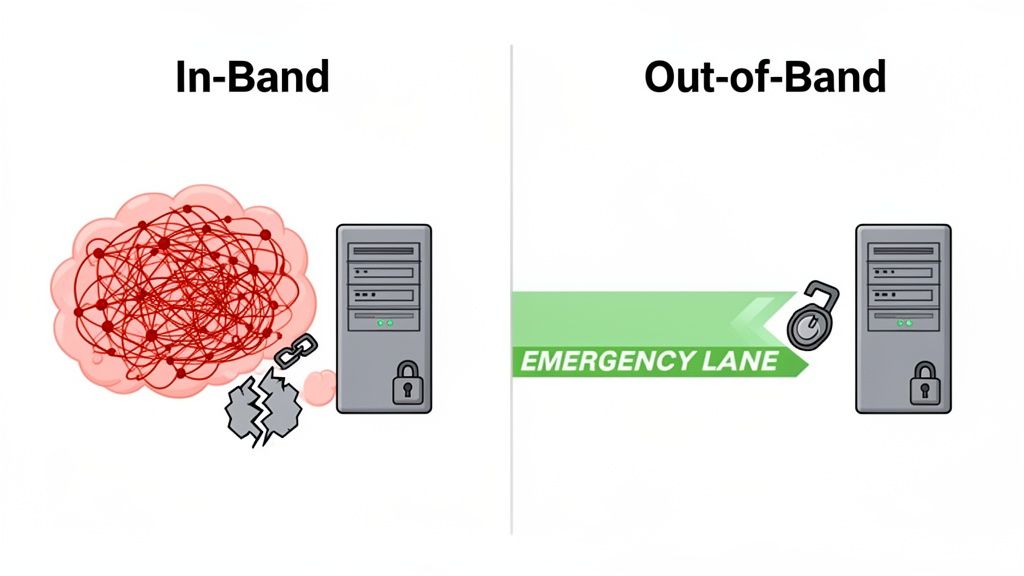
To really get why out-of-band management is so important, it helps to see it side-by-side with its more common cousin, in-band management. The core difference boils down to one simple thing: the network path you use to talk to your gear. While both have their place, they’re built for completely different situations.
In-band management is what most of us use every day. It travels over the same production network as all your normal user and application traffic. When you SSH into a server to run an update or use RDP to check on an application, you're using an in-band connection.
It's straightforward and convenient—no extra cables, no special network setup. But that simplicity is a double-edged sword. If the main network goes down, so does your ability to manage anything on it. You're effectively locked out.
The Limits of In-Band Access
For routine tasks on a healthy system, in-band management is perfect. Think software patches, configuration tweaks, and general monitoring when everything is humming along. The real trouble starts when things go wrong.
A botched network change, a dead switch, or a server with a crashed OS can instantly cut off your in-band access. Suddenly, you have no way to get in, diagnose what happened, or start fixing it from afar. A practical example is a "kernel panic" on a Linux server; the machine is still powered on, but the operating system has completely stopped, making in-band tools like SSH useless.
Out-of-band management (OOBM) is your emergency escape hatch. It operates on a completely separate and isolated network, giving you a reliable backdoor to your hardware that works even when the primary network is completely toast.
A Clear Comparison
This dedicated channel is precisely what makes OOBM a non-negotiable for any critical infrastructure. It provides direct, hardware-level access for disaster recovery, making it the only way to reliably fix system-killing problems without being physically in the room.
To make the distinction crystal clear, let's compare the two approaches directly.
In-Band vs. Out-of-Band Management Feature Comparison
The table below breaks down how these two management philosophies stack up against each other across the most important operational factors.
| Feature | In-Band Management | Out-of-Band Management |
|---|---|---|
| Network Path | Uses the main production network alongside regular data traffic. | Uses a dedicated, physically or logically separate network. |
| Accessibility | Depends on the health of the production network and the OS. | Always available, even if the primary network or OS is down. |
| Security Risk | Higher risk, as management traffic shares a network with user traffic. | Lower risk, as the management plane is isolated from public access. |
| Common Tasks | Software updates, application configuration, routine monitoring. | BIOS/UEFI changes, power cycling, OS reinstallation, firewall recovery. |
Here's a simple analogy to tie it all together: in-band management is for talking to the software running on a machine. Out-of-band management is for talking directly to the hardware itself. When the software stops listening, OOBM is your lifeline to get the hardware's attention.
The Core Benefits of Using Out of Band Management
When you look past the technical jargon, the real value of out-of-band management comes into focus. It’s not just about a second network cable; it’s about building a system that’s more resilient, secure, and efficient. For any IT team, this translates into solving real, everyday headaches.
At its core, OOB management is your ultimate safety net. It’s a guarantee that you can always get in and fix something, no matter how badly the primary system has failed. From that one core idea, a whole host of powerful advantages emerge.
Maximize Uptime and Slash Recovery Time
The most obvious win with OOB is how it crushes downtime. When a critical server locks up or a switch stops responding, every second counts. The old way meant a frantic call, a long drive, and a physical visit to the data center, all while your services are offline.
With a proper OOB setup, an engineer can jump on the problem from anywhere, in minutes. This immediate access to the "virtual crash cart" drastically shrinks the Mean Time to Repair (MTTR)—a metric that directly impacts your bottom line.
Picture this: It's 3 AM, and an alert fires for an e-commerce client's website. It's completely down. Instead of rolling out of bed and driving to a colocation facility, the on-call engineer uses OOB to remotely access the server’s console, force a reboot, and watch it come back online. The site is back up before the client even realizes there was an issue.
Enhance Security by Isolating Management Traffic
Security is another massive advantage. By separating your administrative access onto a physically distinct network, you're effectively hiding the keys to the kingdom from your main production environment.
This isolation dramatically shrinks your attack surface. A bad actor who gains a foothold on your primary network simply can't see or reach the sensitive management ports. It's like putting your control panel in a completely different, unmarked building. For example, even if a web server is compromised, the attacker cannot use it to pivot and access the underlying hardware's management interface if the OOB network is properly isolated.
Improve Operational Efficiency
OOB brings a huge boost to operational efficiency, especially if your hardware is spread across different locations. A small, centralized team of engineers can manage a global fleet of servers without ever needing to book a flight or pay for expensive "remote hands" services just to push a power button.
This centralized power makes everything faster and lets your team focus on more important work. It’s a critical piece of the puzzle for scaling infrastructure smartly, especially for businesses running dedicated hardware like the kind you’d find in high-performance bare metal server deployments.
Achieve Complete Hardware-Level Control
Finally, OOB gives you a level of deep, direct control that in-band tools can only dream of. Because it taps directly into the hardware’s baseboard management controller (BMC), you have total authority over the machine, completely independent of the operating system.
This lets you perform critical actions that are simply impossible over a standard network connection:
- BIOS/UEFI Configuration: Get into the firmware settings to make changes from anywhere.
- Hard Power Cycling: Force a complete "pull-the-plug" style reboot on a machine that's totally frozen.
- OS Reinstallation: Remotely mount an ISO file and build a server from the ground up.
This is the ultimate escape hatch. It means you’re never, ever truly locked out of your own gear.
Real-World Scenarios Where OOBM Is Essential
Theory is one thing, but the real value of out-of-band management shines when things go sideways. In high-stakes environments, OOBM isn't just a nice-to-have; it's often the only thing that prevents a minor hiccup from spiraling into a full-blown catastrophe. Let's look at some real-world situations where it's an absolute game-changer.
Picture this: a network engineer accidentally pushes a faulty firewall rule to hundreds of servers. Just like that, all standard remote access is cut off. The entire production network is a digital brick wall, and everyone is locked out. Without OOBM, the only fix is to dispatch someone to the data center—a costly, slow process of physically touching every single machine.
With an out-of-band connection, an administrator can securely bypass the misconfigured production network. They can access the server's console directly, revert the bad rule, and restore service in minutes, all from a remote location.
This ability to get around a self-inflicted network lockdown is a classic example, but different industries rely on this independent access to solve their own unique challenges.
Large-Scale Data Centers and Colocation
In a massive data center or a colocation facility, you can't just stroll over to a rack and plug in a keyboard. Physical access is slow, impractical, and just doesn't scale. Here, OOBM is the lifeblood of daily operations.
Engineers use it for everything from initial OS installations and BIOS tweaks to troubleshooting a server that has completely dropped off the network. It's what allows a small, efficient team to manage thousands of devices without breaking a sweat.
SaaS Platforms and Cloud Providers
For any Software-as-a-Service (SaaS) or cloud company, uptime is the business. Service Level Agreements (SLAs) aren't just promises; they're contracts with steep financial penalties. Even a few minutes of downtime can tarnish a hard-won reputation.
When an application server crashes hard or the operating system gets corrupted, OOBM provides the most direct and fastest path to recovery. For instance, a database server might freeze due to a memory leak. In-band monitoring stops, but an engineer can use OOBM to access the virtual console, see the kernel error messages, and perform a hard reboot to restore service immediately.
High-Performance Gaming Servers
In the fiercely competitive world of online gaming, performance is everything. Latency and availability can make or break the player experience. A single server crash can kick hundreds of players out of a match, leading to a flood of frustrated support tickets.
Gaming providers use OOBM as an instant "reset button" to reboot a frozen server or diagnose tricky hardware-level performance issues. This gets players back in the game with minimal disruption and keeps the gaming environment stable and reliable.
Managed Service Providers (MSPs)
Imagine being responsible for the IT infrastructure of dozens, or even hundreds, of different clients. That's the daily reality for a Managed Service Provider (MSP).
MSPs depend on OOBM to securely manage this sprawling, distributed fleet of hardware. It's the key to providing 24/7/365 support, letting them fix critical client issues remotely and immediately—whether it's a dead server in a local office or a network switch on the other side of the world.
Best Practices for a Secure OOBM Deployment
Out-of-band management is a sysadmin's lifeline, offering direct, low-level access to your hardware. But with great power comes great responsibility. This "backdoor" is an incredibly attractive target for attackers, and if it's not locked down tight, it can become your biggest security vulnerability.
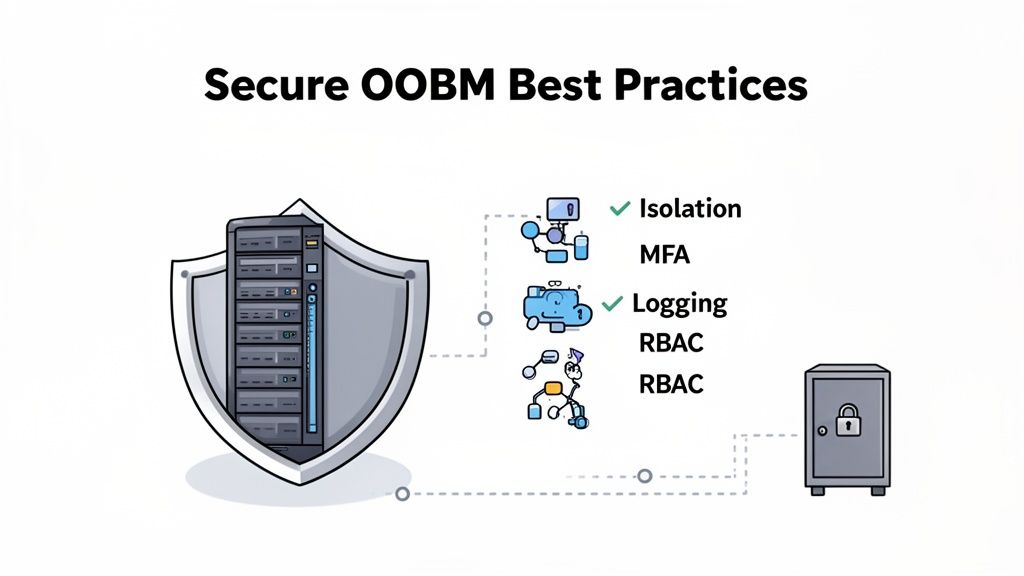
Think of your OOBM network as the most privileged, sensitive part of your entire infrastructure. Your security strategy has to reflect that. It all boils down to isolation, airtight access controls, and keeping a close eye on everything. This ensures your emergency lane doesn't turn into a wide-open highway for intruders.
Isolate the Management Network
This is the golden rule, the non-negotiable first step: strict network isolation. Your OOBM traffic should never travel on the same wires or airwaves as your production traffic. This separation is your single most effective defense.
- Dedicated Hardware: The gold standard is using completely separate physical switches, routers, and cabling for your OOBM network. This creates a true "air gap" that's physically impossible to cross from the production network.
- VLANs: If a completely separate physical network isn't practical, the next best thing is a dedicated Virtual LAN (VLAN). But be warned: this requires careful configuration with strict firewall rules to police the boundary and prevent any traffic from bleeding over.
The goal here is to drastically shrink the attack surface. If an attacker manages to breach your main network, a properly isolated OOBM network will remain completely invisible and inaccessible to them.
Enforce Strong Authentication and Access Control
With the network walled off, the next focus is the front door. Who gets the keys? A weak password on a powerful BMC interface is an open invitation for a catastrophe.
First, implement multi-factor authentication (MFA) on every single OOBM login. A password is no longer enough. Forcing a second factor—like a one-time code from an app or a physical security key—adds a critical, modern layer of protection.
Next, use Role-Based Access Control (RBAC) to apply the principle of least privilege. A junior admin might only need read-only access to check server vitals, while a senior engineer needs the ability to reboot a machine or mount an ISO. RBAC ensures that people only have the exact permissions required for their role, nothing more. This is a core part of a layered defense, just like having advanced DDoS protection guards your primary network entry points.
Maintain Comprehensive Auditing and Logging
If something does go wrong, you need to know exactly who did what, when, and from where. Comprehensive logging and auditing aren't just a good idea; they're essential for security forensics and meeting compliance standards.
Make sure every OOBM device—from console servers and BMCs to intelligent PDUs—is configured to stream its logs to a centralized, secure log management system. You need to capture everything: successful logins, failed attempts, commands run, and any changes to the configuration.
This detailed audit trail becomes your source of truth. Regularly reviewing these logs helps you spot suspicious activity before it escalates and is absolutely invaluable when you need to piece together what happened during a security incident.
Answering Your Top Questions About OOB Management
Let's dig into some of the most common questions people have when they're first getting started with out-of-band management.
Is IPMI the Same as Out-of-Band Management?
That's a great question, and it's easy to see the confusion. The simple answer is no, but they're very closely connected.
Think of out-of-band management (OOBM) as the overall game plan: using a dedicated, separate network to manage your critical hardware. IPMI (Intelligent Platform Management Interface), on the other hand, is one of the key players in that game. It’s a specific standard built into the server's hardware that makes the strategy possible, sitting alongside other tools like console servers and smart PDUs.
Can You Really Use a Cellular Connection for OOB Management?
Yes, and it's an incredibly powerful way to do it. Connecting your OOB network via a cellular modem (like 4G or 5G) is a go-to strategy for building a truly resilient system.
Why? Because the cellular network is completely independent of your facility's primary internet connection. If a construction crew accidentally severs the building's main fiber lines, your wired connection is dead. Your cellular OOB link, however, will be completely unaffected, giving you a reliable back door into your gear.
A cellular OOBM connection is the ultimate safety net. It guarantees you can get in to manage your hardware even during a complete, site-wide internet outage.
How Does OOBM Actually Help During a DDoS Attack?
Imagine your main network is a highway during rush hour, but instead of cars, it's flooded with malicious traffic from a DDoS attack. It's completely gridlocked. Your usual remote access tools are stuck in that traffic jam, unable to get through.
Your OOBM network is like a private service road running alongside the highway. It’s completely separate and clear of all that congestion. This allows you to bypass the chaos, log in securely, and start taking action—like tweaking firewall rules or rerouting traffic—while the main network is still under assault.
Is OOBM Just for Giant Data Centers?
Not at all. While it's absolutely non-negotiable for large-scale operations, the principle behind OOBM is valuable for any organization that relies on its hardware.
Even a small business with a couple of critical servers in a colo rack benefits hugely. The ability to reboot a frozen server or diagnose a network issue from your desk instead of driving to the facility at 2 a.m. saves an enormous amount of time and money, no matter how big your setup is.
At Soraxus, we believe this level of control shouldn't be an optional extra. That's why all our bare metal and colocation solutions come with out-of-band management built-in, giving you resilient, around-the-clock access to your infrastructure. Secure your hardware with our enterprise-grade solutions today.