Dedicated servers with ddos protection: Secure Your Hosting Today

Soraxus Assistant
December 18, 2025 • 25 min read
When you lease a dedicated server, you're getting a powerful machine all to yourself. But that power needs protection. A dedicated server with DDoS protection is simply a physical server fortified with specialized security designed to identify and block malicious traffic before it ever reaches you.
This setup ensures that all your server's resources—its CPU, memory, and bandwidth—are working for your legitimate users, not fighting off a digital mob. For any application that can't afford to go down, this isn't just a feature; it's a lifeline.
Why Your Dedicated Server Needs DDoS Protection
A standard dedicated server is a powerhouse, giving you exclusive access to all its hardware. Imagine it’s a private office building with a huge, wide-open front door. It’s fantastic for letting your employees and clients come and go, but that open door is a massive security risk without a team at the front desk.
A Distributed Denial-of-Service (DDoS) attack is like an angry, organized crowd swarming that entrance, completely blocking anyone legitimate from getting in. No matter how powerful your server is, raw hardware alone can't stand up to this kind of assault. The fastest processor and biggest network pipe will crumble under a tidal wave of junk traffic.
The fallout from an attack isn't just a minor inconvenience. It can have serious, lasting consequences.
The Real-World Risks of Being Unprotected
Without a solid defense, your entire operation is exposed. The damage isn't just technical—it hits your wallet and your reputation hard.
Here’s what you’re up against:
-
Crippling Downtime: An attack can knock your website, app, or game server completely offline. That means lost sales, angry customers, and a business that’s dead in the water. For example, a popular online retailer could lose hundreds of thousands of dollars in revenue if their site goes down during a flash sale.
-
Lasting Brand Damage: If your service is unreliable, people will leave and never come back. A single big outage can shatter the trust you’ve worked so hard to build.
-
Financial Losses: It’s not just about the revenue you lose during the outage. You’ll also face costs for emergency IT help, customer support overtime, and maybe even data recovery.
To get a clearer picture of the concepts we'll be discussing, this table breaks down the essential terminology.
Key DDoS Protection Concepts at a Glance
| Term | Description | Analogy |
|---|---|---|
| Mitigation | The process of identifying and filtering out malicious DDoS traffic while allowing legitimate traffic to pass through. | A nightclub bouncer checking IDs and only letting invited guests in, while turning away crashers. |
| Scrubbing Center | A centralized data center with high-capacity equipment designed to "scrub" incoming traffic by removing malicious packets. | A water treatment plant that filters out contaminants, ensuring only clean, safe water flows to homes. |
| Anycast Network | A network routing method where an IP address is advertised from multiple locations, directing traffic to the nearest node. | A global fast-food chain. When you search for it, you're directed to the closest restaurant, not the HQ. |
| Attack Surface | The total number of potential entry points an attacker could use to launch a DDoS attack against your infrastructure. | All the doors and windows of a house. The more there are, the more places a burglar could try to break in. |
Understanding these terms is the first step toward building a truly resilient infrastructure. Now, let's look at why this has become such a critical issue.
The need for built-in protection isn't just a theory; it’s a market reality. As attacks have become more frequent and sophisticated, the global DDoS protection market was valued at around $4.68 billion in 2024. Experts predict it will explode to over $20 billion by 2033. This massive growth shows how the industry has shifted to making mitigation a standard part of hosting. Discover more insights on the DDoS protection market from Grand View Research.
Think about a fast-growing e-commerce store on an unprotected server during a Black Friday sale. An attacker could spend just a few dollars to launch an attack that takes the site offline, costing the business tens of thousands in lost sales and customer loyalty.
This is exactly why dedicated servers with DDoS protection are now the default choice. It’s no longer an optional upgrade—it's a fundamental part of keeping your business online and operational in a very hostile digital world.
How Modern DDoS Mitigation Actually Works
Ever wondered what’s really going on behind the scenes when a server weathers a massive DDoS attack? It's less like a simple firewall and more like a highly sophisticated traffic control system, designed to spot and sideline malicious traffic while waving legitimate users through. The end goal is always the same: keep your dedicated server online and responsive, no matter what’s being thrown at it.
At its heart, modern mitigation is all about intelligent, multi-layered traffic inspection. Think of it as a security checkpoint with multiple stages. It constantly monitors incoming data, making split-second decisions to filter out threats before they ever reach your server's core resources.
This visual gives you a great at-a-glance look at the difference—a protected server stands firm while an unprotected one gets overwhelmed.
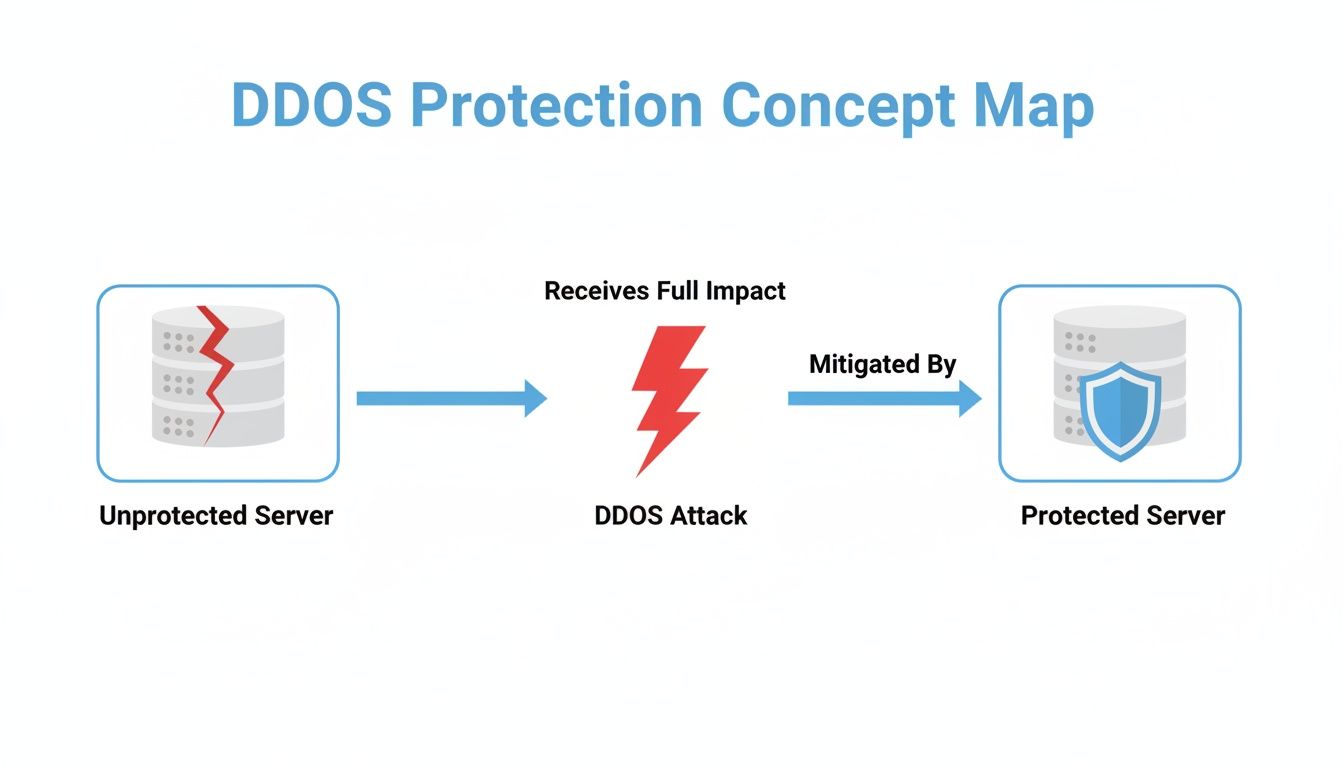
The key is that the protection acts as a buffer, absorbing the malicious flood so your server's resources are saved for real users. To pull this off, providers rely on two primary defense models.
On-Premise Mitigation: The Local Guardian
On-premise mitigation is like having a bouncer standing right at your server's front door. This usually involves a physical appliance or specialized hardware sitting in the same data center as your server. This gear is built for one thing: inspecting traffic at line speed, meaning it can deflect a certain volume of attack traffic without creating any noticeable lag.
The big win here is reaction time. Because the filtering happens so close to home, the response to smaller, more common attacks is almost instantaneous. For applications where every millisecond is critical—like online gaming or high-frequency trading—this immediate defense is a game-changer. For example, a small but sharp attack on a financial trading platform could disrupt transactions; an on-premise device would instantly block it, ensuring trades continue without delay.
But even the best bouncer has a limit. A massive volumetric attack, throwing hundreds of gigabits of junk traffic per second, can easily overwhelm the on-premise hardware and the data center's own internet connection. It’s like trying to hold back a tsunami with a single floodgate.
Cloud-Based Scrubbing: The Global Reinforcement
Cloud-based scrubbing works on a completely different scale. Picture a global network of massive, high-capacity security facilities known as scrubbing centers. When a large-scale attack is detected, all of your server's inbound traffic is intelligently rerouted to the closest scrubbing center.
Inside these centers, an immense amount of computing power and advanced filtering systems get to work. They analyze every packet, "scrub" away the malicious data, and then pass only the clean, legitimate traffic back to your server. The strength of this model is its sheer capacity. A proper global scrubbing network can absorb terabit-level attacks that would knock any single on-premise device offline in an instant.
The gold standard for a resilient defense today is a hybrid model. This strategy combines the lightning-fast response of on-premise hardware for small attacks with the colossal capacity of cloud-based scrubbing for overwhelming floods, giving you the best of both worlds.
The Hybrid Model: Combining Speed and Scale
The most effective dedicated servers with DDoS protection don't make you choose between speed and scale—they use a hybrid approach. This model weaves on-premise and cloud-based defenses into one seamless, automated system.
Here’s how it plays out in the real world:
-
Normal Operation: All traffic flows directly to your server, passing through an on-premise filter that provides instant, low-latency protection against common, smaller-scale attacks. A typical example would be a simple UDP flood targeting a VoIP server, which the on-premise gear handles without any call quality degradation.
-
Large Attack Detected: The moment the on-premise system detects an attack that exceeds its capacity—say, a 500 Gbps volumetric flood—it automatically signals the global cloud network for backup.
-
Traffic Rerouted: Your traffic is instantly diverted to the nearest scrubbing center, which has the power to handle multi-terabit floods.
-
Clean Traffic Forwarded: The scrubbing center filters out the attack traffic with surgical precision and sends only the legitimate user requests back to your dedicated server.
This two-layer defense ensures that everyday nuisances are handled without adding latency, while catastrophic attacks are absorbed by a global network built for exactly that purpose. For any business that needs both peak performance and airtight security, understanding the nuances of enterprise-grade DDoS protection is the first step toward building a truly resilient online operation. This strategy keeps your server online and performing at its best, protecting your infrastructure and your reputation.
Setting Up Your Protected Server for Success
It’s one thing to understand the theory behind DDoS mitigation, but it's another thing entirely to roll up your sleeves and deploy a server that can actually withstand an attack. A successful setup isn't just about flipping a switch on your protection; it's about building a resilient infrastructure from the very beginning. The first step? Ditching the guesswork and getting serious about capacity planning.
You have to plan for two different realities: your normal, everyday traffic and the brutal, sudden onslaught a DDoS attack brings. This means getting a solid handle on your baseline network usage—what do your peak hours look like? What’s the typical data flow? Once you have that baseline, you can build in enough headroom to absorb an attack without your services grinding to a halt.
Designing a Resilient Network Architecture
Raw capacity is important, but your network’s design is what will ultimately determine if your server survives an attack. A non-negotiable part of any robust setup is out-of-band (OOB) management.
Think of your main network connection as a multi-lane highway. A DDoS attack turns that highway into a complete standstill—a traffic jam of malicious packets. OOB management is your private, secure service road that completely bypasses the gridlock.
This separate, dedicated connection ensures you always have administrative control over your server, even when the primary network is completely swamped. It’s your lifeline for performing critical tasks right in the middle of a crisis:
-
Rebooting the server
-
Monitoring system health in real-time
-
Tweaking firewall rules on the fly
-
Accessing the console directly for emergency changes
Without OOB management, you’re locked out of your own house during a break-in. It's an essential safety net for any serious deployment of dedicated servers with DDoS protection.
Multiplying Your Defenses with Anycast Routing
Another game-changing tool for your network design is Anycast routing. This technique acts as a strategic force multiplier, boosting both performance and security. Instead of your server existing at a single, fixed address, an Anycast network announces its IP from multiple datacenters around the world at the same time.
When a visitor connects, they are automatically routed to the geographically closest node. For them, this means lower latency and a much snappier user experience. For you, it means a much stronger defense.
Anycast creates a distributed front line for your server. An attack is no longer aimed at a single point but is dispersed across a global network, with each node absorbing and mitigating a piece of the flood locally.
Take a global streaming service, for instance. They use Anycast to connect viewers to the nearest datacenter, which is why your video plays smoothly without buffering. When that service gets hit with a DDoS attack, the malicious traffic is also distributed. Instead of overwhelming one location, the attack is diluted across scrubbing centers in New York, London, and Singapore. The result is high-speed, localized mitigation that doesn't drag down global performance.
The need for this kind of sophisticated defense isn't theoretical. The latest threat intelligence shows that both the frequency and size of attacks are exploding. Some providers saw network-layer attacks make up 71% of all incidents in Q3 2025, with some volumetric attacks peaking at an unbelievable 29.7 Tbps. Since dedicated servers often power highly latency-sensitive applications like game servers and financial trading platforms, having inline mitigation that can handle these massive events without a performance hit is crucial. You can read the full research on recent DDoS threat trends to get a better sense of these operational realities.
How to Choose the Right Provider
Picking a provider for a DDoS-protected dedicated server can feel like navigating a minefield. Everyone throws around big numbers and flashy promises about "impenetrable security," but the truth is, not all protection is built the same. To make a smart decision, you have to cut through the marketing fluff and look at the technical details that actually matter.
This guide is designed to give you a clear-headed checklist. We'll focus on the critical criteria that separate a basic, checkbox-ticking service from a true enterprise-grade solution that can actually safeguard your operations. A real partner doesn't just sell you hardware; they provide the resilient foundation your business needs to stay online.

Mitigation Capacity and Network Architecture
The first thing to look at is the provider's mitigation capacity, which you'll see advertised in Terabits per second (Tbps) and millions of packets per second (Mpps). Tbps tells you how much raw, brute-force traffic the network can absorb, while Mpps shows its muscle against more complex attacks that try to overwhelm your server with a flood of tiny packets.
A host claiming "100 Gbps protection" might sound good, but modern attacks can easily blow past 1 Tbps. Look for a provider with a global capacity well over 1 Tbps. That's the only way to be sure they can handle a massive volumetric flood without even breaking a sweat.
The network design is just as important. A provider using one big, centralized scrubbing center is setting you up for failure—it's a single weak point that introduces a ton of latency for your users. The gold standard is a globally distributed network of scrubbing centers that uses Anycast routing. This approach means attack traffic is fought off at the edge of the network, right where it starts, keeping performance snappy for your real customers.
A common mistake is focusing only on the "Tbps" number. A provider's ability to process millions of packets per second (Mpps) is just as critical for defending against sophisticated TCP-based attacks that aim to exhaust server resources rather than just network bandwidth.
The Service Level Agreement Guarantees
Think of the Service Level Agreement (SLA) as your contract—it's where verbal promises become legally binding guarantees. A generic "99.9% uptime" guarantee is the bare minimum and doesn't say anything about DDoS protection quality. A solid SLA gets specific.
Here’s what you should be looking for:
-
Time-to-Mitigate: This is the big one. It's a promise of how fast the system will detect an attack and start fighting back. A guarantee of less than one minute is fantastic. Anything longer is leaving you exposed.
-
Packet Loss and Latency: During an attack, a top-tier provider ensures your service doesn't grind to a halt. The SLA should spell out acceptable levels of packet loss and latency while mitigation is active.
-
Service Credits: A good SLA has teeth. If the provider fails to meet their time-to-mitigate or performance promises, they should offer significant service credits. It keeps them honest.
Imagine you're running a gaming service. Even a few minutes of lag from a UDP flood can ruin the experience for players and cause them to leave for good. The SLA is your assurance that the provider is confident enough in their tech to put their money on the line.
Support and Technical Expertise
When an attack hits, the last thing you want is to be stuck in a support queue or explaining the situation to a chatbot. In a crisis, you need immediate access to security experts who know exactly what's happening and can take control. 24/7/365 expert support isn't a luxury; it's a must-have.
Test them before you commit. Ask pointed questions about their mitigation techniques and escalation process. You’ll quickly find out if you're talking to a real network engineer or just a first-line agent reading from a script. For instance, ask them how they differentiate a legitimate traffic spike from a Layer 7 DDoS attack targeting your login API. A true expert will discuss rate limiting, behavioral analysis, and custom rule sets, not just give a generic answer. The best providers offer phone, live chat, and ticket support with rapid response times, ensuring a qualified expert is there the moment you need them. When you’re choosing from the many bare metal dedicated servers available, the quality of the support team should be a huge part of your decision.
Ready to put providers to the test? Use this checklist to make a direct, apples-to-apples comparison.
Provider Evaluation Checklist for Dedicated Server DDoS Protection
Use this checklist to compare potential providers based on the most critical technical and service-level features for robust DDoS protection.
| Evaluation Criteria | What to Look For | Why It Matters |
|---|---|---|
| Mitigation Capacity | Global network capacity over 10 Tbps and high Mpps processing. | Ensures the network can absorb even the largest volumetric and application-layer attacks without performance degradation. |
| Network Architecture | Globally distributed scrubbing centers with Anycast routing. | Minimizes latency by mitigating attacks at the network edge, closest to the source, and eliminates single points of failure. |
| Time-to-Mitigate SLA | A guaranteed mitigation response time of under 60 seconds. | A fast, automated response is crucial to preventing service disruption and protecting user experience the moment an attack begins. |
| Performance SLA | Guarantees on packet loss and latency during mitigation. | Ensures that legitimate traffic continues to flow smoothly and your applications remain responsive even while under attack. |
| SLA Penalties | Meaningful service credits for failing to meet SLA guarantees. | A provider willing to back their promises with financial penalties demonstrates true confidence in their infrastructure and services. |
| 24/7 Expert Support | Direct access to Tier 2/3 network security engineers. | During a crisis, you need immediate access to experts who can diagnose and resolve complex issues, not just a basic help desk. |
| Transparency & Reporting | Real-time dashboards and detailed post-attack reports. | Provides visibility into attack vectors and mitigation actions, helping you understand your threat profile and the value of the protection. |
By systematically working through these points, you can move beyond marketing claims and evaluate a provider based on what truly counts: their technical capability, their contractual promises, and their expert support.
Matching Protection to Your Industry Needs
A one-size-fits-all approach to DDoS protection is a recipe for disaster. Think of it like this: you wouldn't use the same security system for a local storefront as you would for a bank vault. The needs are completely different, and the same goes for protecting your online services.
What works for a massive enterprise is overkill for a gaming community, and what a gaming community needs would leave a SaaS platform exposed. Choosing the right dedicated servers with DDoS protection is all about zeroing in on your specific threat model, performance benchmarks, and what you absolutely cannot afford to lose. It means getting granular and aligning the protection capabilities with your core business.
Enterprise Applications and Business Continuity
For any enterprise, the name of the game is stability. The focus is squarely on data security, meeting compliance standards like PCI or HIPAA, and ensuring the business never stops running. Downtime isn't just an annoyance; it's a catastrophic event that can trigger huge financial penalties, erode customer trust, and tarnish a brand's reputation overnight.
This means you need protection that goes far beyond just soaking up massive traffic floods. The real threats often live at Layer 7, targeting the complex application logic and APIs that run your business. For instance, an attack might repeatedly hit a computationally expensive search query on an e-commerce site, exhausting database resources rather than network bandwidth. That’s why a rock-solid Service Level Agreement (SLA) is absolutely essential. You need a guarantee not just for uptime, but for a lightning-fast time-to-mitigate, ensuring that any attack is shut down in moments, not minutes.
High-Performance Game Hosting
In the gaming world, latency is king. Milliseconds matter. For a game server host, even a tiny bit of lag can make a fast-paced shooter unplayable, sending frustrated players flocking to your competitors. So, when it comes to DDoS protection, speed is everything.
The solution has to be built for performance from the ground up. This usually involves a global network using Anycast routing, which keeps the filtering and scrubbing centers physically close to your players, slashing any potential for added latency. The protection also needs to be finely tuned to understand gaming traffic—specifically, how to fend off the massive UDP floods that are a favorite weapon for attackers in this space. If you want to dive deeper into this topic, our guide on DDoS protection for game servers offers more specialized insights.
SaaS Platforms and Application Availability
If you run a Software-as-a-Service (SaaS) platform, your uptime is your customers' uptime. You're not just protecting your own business; you're safeguarding the operations of every single client who depends on your application. An attack on your infrastructure creates a massive ripple effect.
For a SaaS business, the application itself is the main asset. Therefore, DDoS protection must be intelligent enough to distinguish between legitimate user API calls and a malicious flood of application-layer requests designed to exhaust server resources.
SaaS providers need a defense that's more surgical than brute-force. Key features include:
-
Advanced Layer 7 Protection: This is critical for defending against sophisticated HTTP floods and attacks aimed directly at your APIs. A practical example is an attack that repeatedly initiates the "forgot password" process, overloading email servers and databases.
-
Intelligent Rate Limiting: You need to be able to control traffic flow to prevent abuse while ensuring fair resource access for all your customers.
-
Real-Time Analytics: Deep visibility into your traffic is non-negotiable for spotting emerging threats and understanding user behavior.
Managed Service Providers and Multi-Tenancy
Managed Service Providers (MSPs) have a uniquely complex job. They're juggling the infrastructure for a whole portfolio of different clients, each with their own needs and risk profiles. For them, the priorities are scalability, fine-grained control, and the ability to package and resell security as a core part of their service.
The ideal solution for an MSP is a centralized platform that lets them manage protection policies for dozens or hundreds of clients from a single pane of glass. For example, they might apply a strict, low-latency policy for a client running a game server and a more relaxed, cost-effective policy for another client with a simple brochure website. Detailed, per-client reporting is also crucial—it's how they prove their value and quickly troubleshoot problems. Most importantly, the underlying protection has to be robust and flexible enough to handle anything their clients throw at it, from a simple WordPress site to a mission-critical financial application.
Got Questions? We've Got Answers.
When you're diving into DDoS-protected dedicated servers, a few questions always seem to pop up. Getting straight answers is key to making a smart decision that fits both your technical needs and your budget. Let's break down some of the most common things we hear from businesses, developers, and hosting pros.
We'll cover how to figure out your actual protection needs, what the deal is with different mitigation models, and the big one: performance. The goal here is to give you quick, practical insights you can actually use.
How Much DDoS Protection Do I Really Need?
Figuring out the right level of protection isn't about chasing the biggest number—it's about understanding your real-world risk. The best place to start is by looking at your own traffic. A small business website might only need a shield against common, low-volume attacks. On the other hand, a popular gaming server or a busy e-commerce site is a magnet for trouble and needs a serious defense that can soak up massive, multi-terabit floods.
You also have to think about your industry. Gaming, finance, and online retail are prime targets. A solid rule of thumb is to partner with a provider whose total network capacity is way bigger than the largest attacks you see in the news. That ensures they have plenty of muscle to defend your server without breaking a sweat.
Always-On vs. On-Demand: What's the Difference?
The main distinction here is simple: when does the protection kick in?
-
Always-On Protection: Think of this as a permanent security detail. All of your traffic is constantly flowing through the mitigation system. This gives you the fastest possible reaction time—we're talking detection and blocking in under a second—because it’s always on guard. It's the only real choice for anything sensitive to lag, like game servers or VoIP, where even a few seconds of interruption is a dealbreaker.
-
On-Demand Protection: This is more like a security team that's on call. The system only jumps into action after it detects an attack. While it can be cheaper, it leaves a small but critical gap between when the attack starts and when the defense activates. That brief window is often all it takes to knock you offline, making it a risky bet for mission-critical services.
For almost any application where performance is a priority, always-on protection is the clear winner. Its proactive, 24/7 monitoring means mitigation is instant, stopping an attack dead in its tracks before it can cause any downtime or lag.
Will DDoS Protection Slow Down My Server?
It’s a fair question, but with a properly engineered solution, the answer is a firm no. A high-quality provider doesn't just stick a filter in front of your server; they use a sophisticated, globally distributed network with Anycast routing. This technology is smart enough to route your traffic to the nearest "scrubbing center" for inspection.
Since this all happens at the network edge, physically close to your users, the extra travel time is incredibly small—often just a few milliseconds. For a user in London connecting to a server in London, the traffic is scrubbed locally, adding virtually no noticeable delay. A premium dedicated server with DDoS protection is designed to be completely transparent when things are quiet and to keep your legitimate traffic flowing at full speed, even when it's fighting off a massive attack.
Where Do You Go From Here?
We've covered a lot of ground, from the nuts and bolts of DDoS mitigation to the strategic thinking that goes into building a resilient online presence. Hopefully, it's clear that powerful server hardware and sophisticated DDoS protection aren't just separate items on a shopping list—they're two halves of a whole, essential for keeping your operations online and performing at their best.
The real goal here isn't just to hand you a technical manual. It's to give you the confidence to take what you've learned and put it into practice. Moving from theory to a live, secure deployment is the most critical step.
Your Action Plan
Let's distill all this information into a clear, four-step plan. Think of this less as a simple checklist and more as a strategic framework for making a sound investment in your infrastructure's future.
-
Take an Honest Look at Your Risks: Before you do anything else, audit your current setup. Where are the weak spots? What would an hour—or a day—of downtime actually cost your business in lost sales, customer trust, and brand damage? Get real about the financial and reputational stakes.
-
Map Out Your Technical Needs: Get specific. Document your typical traffic patterns and, more importantly, your peak loads. What level of latency is acceptable for your users? Are there any specific compliance standards you need to meet? A detailed brief saves a ton of time and prevents you from buying the wrong solution.
-
Use the Checklist to Scrutinize Providers: Take the checklist we provided earlier and apply it rigorously. Don't just read the marketing copy. Dig into the details: what is their real-world mitigation capacity? How is their network architected? What are the actual, concrete guarantees in their SLA?
-
Talk to a Pro: Before you sign anything, have a conversation with a network security expert. They've seen it all and can help you spot potential pitfalls you might miss. An expert review can ensure your setup is truly optimized for performance and security from the get-go.
Following these steps turns a daunting decision into a structured, manageable process. You're not just buying a server; you're methodically building a digital fortress that gives your business a stable platform to grow on, free from the constant threat of disruption.
Ready to build an infrastructure that can stand up to anything? Soraxus provides high-performance dedicated servers with advanced, always-on DDoS protection designed for mission-critical applications. Explore our secure hosting solutions today.