Dedicated Server vs VPS: A Complete Comparison Guide

Soraxus Assistant
December 23, 2025 • 23 min read
When you're laying the foundation for your website or application, the choice between a dedicated server and a VPS boils down to a simple concept: sharing vs. owning.
Think of it this way: a Virtual Private Server (VPS) is like leasing a high-end apartment. You get your own secure, private space with its own kitchen and bathroom, but you still share the building's main structure and utilities. A dedicated server, on the other hand, is like owning a standalone house. Every square foot, every wire, and every pipe is yours and yours alone.

Understanding The Core Differences
Picking the right hosting isn't just a technical detail; it's a critical business decision. While both a VPS and a dedicated server are a huge step up from basic shared hosting, they're built for entirely different purposes. The real distinction is how they handle and isolate server resources.
A VPS is created using virtualization. A single, powerful physical server is cleverly partitioned into multiple, isolated virtual machines. Each VPS operates as its own self-contained server, complete with a guaranteed slice of CPU, RAM, and storage. It’s a fantastic middle ground that balances power, control, and cost. For example, a growing e-commerce business could start on a VPS to manage its online store, getting the performance it needs without the high cost of its own physical hardware.
A dedicated server throws the "sharing" concept out the window. When you go this route, you’re renting an entire physical machine. That means 100% of the server's resources—every CPU core, every gigabyte of RAM, and all of the storage—are at your exclusive disposal. This single-tenant setup completely eliminates the "noisy neighbor" problem, where another user on the same hardware could impact your performance. For a deep dive into what this means in practice, you can explore the specifics of our bare metal server offerings.
At-a-Glance Comparison: Dedicated Server vs VPS
This summary table highlights the key differentiators between the two hosting types to give you a quick reference before our detailed analysis.
| Feature | Virtual Private Server (VPS) | Dedicated Server |
|---|---|---|
| Resource Allocation | Guaranteed virtual resources on a shared physical server. | Exclusive access to an entire physical server's resources. |
| Performance | High and reliable, but can be influenced by other tenants. | Consistently superior, predictable, and unshared. |
| Isolation & Security | Strong logical isolation, but shares underlying hardware. | Complete physical isolation for maximum security. |
| Best For | Growing businesses, medium-traffic sites, and test environments. | High-traffic enterprises, large databases, and compliance-heavy apps. |
| Cost | More affordable, offering a mid-range price point. | Premium investment for maximum power and control. |
The market really shows how these two options serve different needs. VPS hosting is booming and is expected to grab over 25% of the web hosting market by 2025. It's the perfect fit for small and medium-sized businesses that need room to grow without a huge initial investment. Meanwhile, the dedicated server market, valued in the billions, is the go-to for high-stakes operations where top-tier performance and security are absolutely essential.
The fundamental choice is between the agile, cost-effective autonomy of a VPS and the absolute, uncompromising power of a dedicated server. Your decision will depend on whether your priority is flexible growth or guaranteed peak performance.
How Performance and Resources Are Allocated
When you're weighing a dedicated server against a VPS, the biggest difference comes down to how they handle computing resources. This single factor directly impacts everything—your application's speed, its stability under pressure, and its ability to keep up with user demand. Getting this choice right is fundamental.
A Virtual Private Server (VPS) works by giving you guaranteed resources within a shared environment. Using virtualization, a powerful physical server is sliced into several isolated virtual machines. Each VPS gets its own dedicated slice of CPU cores, RAM, and storage.
This is a huge step up from basic shared hosting, where you're constantly fighting for a fluctuating pool of resources. With a VPS, the RAM and CPU cores you pay for are yours and yours alone.
But the key detail is that you're still sharing the underlying hardware. Things like the network card, CPU cache, and disk I/O channels are communal property among all the VPS tenants on that machine. That’s where performance can get a little unpredictable.
The Noisy Neighbor Effect in a VPS Environment
The "noisy neighbor" effect is a classic headache in any shared hosting setup. It happens when one user's heavy workload starts to drag down performance for everyone else on the same physical server.
Imagine your e-commerce store is humming along on a VPS. If another tenant on that same box suddenly launches a viral marketing campaign or kicks off a massive data import, their activity can monopolize shared components like disk I/O. Even though your RAM and CPU are guaranteed, your site's database queries might slow to a crawl, leading to frustratingly slow page loads and abandoned shopping carts.
- Practical Example: A B2C E-commerce Site
A fashion retailer hosts its online store on a VPS, and performance is great on most days. But on Black Friday, another tenant—a popular gaming blog—gets slammed with unexpected traffic. This chokes the physical server's network card, causing the retailer's checkout process to lag and costing them sales.
The core vulnerability of a VPS is that even with guaranteed resources, you are still susceptible to performance bottlenecks created by others on the same physical machine. Your peak performance is ultimately capped by the shared hardware's total capacity.
A real-world case shows just how risky this can be when a business outgrows its VPS. A SaaS startup, trying to save money, hit a performance wall at 10,000 users. Database queries slowed to an agonizing eight seconds. Their emergency migration to a dedicated server led to six hours of downtime, a 23% spike in customer churn, and an immediate $8,000 revenue loss, putting their funding round in jeopardy. It’s a harsh lesson on aligning your hosting with performance needs, a topic you can dive deeper into with these insights on cloud VPS vs dedicated servers.
Dedicated Servers: Unshared and Uncompromising Power
A dedicated server sidesteps the multi-tenant model entirely, eliminating the noisy neighbor problem. When you go dedicated, you’re renting 100% of an entire physical machine. Every last resource is exclusively yours.
This single-tenant setup delivers the absolute highest level of performance consistency. You aren't competing with anyone for CPU cycles, RAM, storage I/O, or network bandwidth. The power you have on day one is the same raw, predictable performance you can count on during your biggest traffic spikes.
For many applications, this isn't a luxury; it's a non-negotiable requirement.
- Practical Example: A Data Analytics Company
A data analytics firm has to process huge datasets for its clients every single day. Their software demands constant, high-throughput disk I/O and intensive CPU power for hours at a time. A VPS just wouldn't cut it—any slowdown caused by other tenants could corrupt a long-running analysis or double the processing time. The uninterrupted, raw power of a dedicated server is mission-critical for meeting client deadlines and ensuring data integrity.
This exclusive access guarantees that resource-hungry tasks—compiling code, running large databases, transcoding video, or hosting a high-traffic SaaS application—can run without any outside interference. You get consistent and predictable power right when you need it most.
Comparing Security and Data Isolation
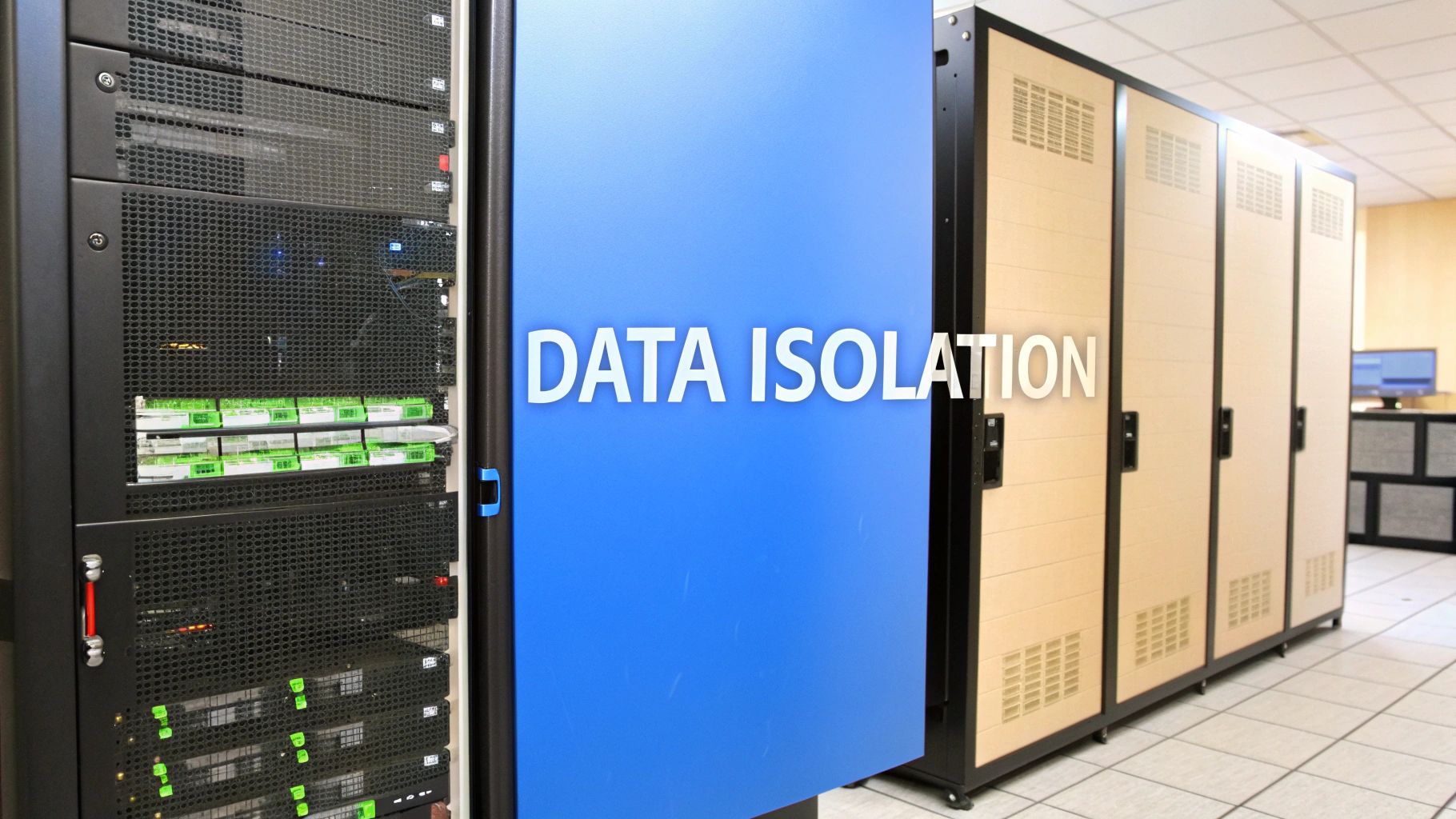
Security isn't just another box to check; it’s the bedrock of your hosting strategy. The fundamental architectural differences between a VPS and a dedicated server directly impact how your data is protected and walled off from potential threats.
In a VPS environment, security is all about strong, software-level isolation. The hypervisor—the software layer that creates and runs virtual machines—divides a single physical server into multiple, self-contained virtual servers. This is designed to keep your files and processes completely separate from other tenants sharing the same hardware.
For the vast majority of applications, this logical separation is more than enough. However, the shared hardware does introduce a small, theoretical attack surface. A highly sophisticated attack aimed at the hypervisor itself could, in theory, bridge the gap between virtual environments.
The Nuances of Virtualized Security
The main security consideration with a VPS is that shared foundation. Even though your virtual server runs on its own, it still shares physical resources like the CPU, network card, and motherboard with other users.
This shared infrastructure means a serious vulnerability on one VPS, or in the virtualization software managing it, could potentially affect others on that same machine. It's a risk that good hosting providers manage with constant patching and monitoring, but it’s an inherent part of the multi-tenant model.
A more common issue in shared environments is a distributed denial-of-service (DDoS) attack. If another tenant gets hit with a huge attack, it can swamp the physical server's network connection, causing a ripple effect that slows down everyone else. This is where robust, infrastructure-level protection becomes absolutely critical.
The security model of a VPS hinges on logical isolation. While it's incredibly effective for most projects, you're ultimately trusting your provider to flawlessly secure the entire multi-tenant system.
Dedicated Servers and Absolute Physical Isolation
When you move to a dedicated server, the conversation shifts from logical separation to absolute physical isolation. This is the gold standard for security in a single-server environment. You are the only one using the hardware. Period.
This single-tenancy model completely erases the risks tied to shared infrastructure. There are no "noisy neighbors" to contend with, no hypervisor vulnerabilities that could expose your data, and zero chance of a security issue bleeding over from another user's account. Your security perimeter is your machine and your machine alone.
This level of isolation isn't just a nice-to-have; it's often a strict requirement for businesses that handle sensitive information. For industries bound by tight compliance regulations, this kind of separation is non-negotiable. To see how this plays out against real-world threats, you can learn more about our approach to providing dedicated servers with DDoS protection.
Compliance and Real-World Scenarios
The dedicated server vs. VPS debate often comes to a quick conclusion when compliance enters the equation. Regulations like the Payment Card Industry Data Security Standard (PCI DSS) and the Health Insurance Portability and Accountability Act (HIPAA) demand airtight control over data.
- Practical Example: A Fintech Application
Imagine a financial tech company that processes and stores sensitive credit card data. To meet PCI DSS requirements, their data environment must be completely segregated to prevent any possible breach. A dedicated server's physical isolation gives them a clean, auditable boundary that makes proving compliance much more straightforward than in a shared setup.
In cases like this, the complete data segregation of a dedicated server is the only path forward. The cost or performance advantages of a VPS become secondary when regulatory and security mandates require verifiable, total isolation. Your security posture is entirely in your hands.
Scaling and Day-to-Day Management: Planning for Growth
How you handle growth and manage your server daily is a huge part of this decision. Your choice comes down to how fast you need to adapt, what your growth looks like, and who on your team is going to be handling the technical side of things.
A Virtual Private Server (VPS) is all about agility. Since it’s part of a larger virtualized system, changing its resources on the fly is its main strength. When your needs suddenly shift, resizing your server is usually just a few clicks away in your control panel.
Picture this: your small e-commerce site gets an unexpected shout-out on a popular morning show. Suddenly, traffic explodes by 1000%. With a VPS, you could instantly add more CPU cores and RAM to keep the site from crashing, capturing all those new sales. The whole process typically requires just a quick reboot, meaning you're only down for a few moments.
How VPS Scalability Works in Practice
A VPS gives you a really flexible runway for growth. You can scale resources up or down as traffic demands, which is perfect for businesses with unpredictable traffic or those in a rapid growth phase.
-
Vertical Scaling: This is the name of the game for VPS. You simply add more resources—CPU, RAM, storage—to your existing virtual server.
-
Minimal Downtime: Upgrades don't involve swapping out physical parts. Usually, a quick and simple reboot is all it takes.
-
Pay-as-you-grow: You only pay for the resources you're actually using, so you aren't sinking money into hardware that’s sitting idle.
This kind of flexibility is a lifesaver for development environments, startups, and businesses with seasonal traffic—think of a retailer gearing up for the holiday shopping rush. You get exactly the power you need, right when you need it.
Scaling a Dedicated Server: A More Methodical Approach
Scaling a dedicated server is a completely different beast. It's a much more intentional, hands-on process. Because you're dealing with a physical machine, adding resources means physically swapping out hardware components. This isn't something you can do at a moment's notice.
With a dedicated server, scalability is a planned event, not an instant reaction. It requires careful forecasting and scheduled maintenance to upgrade physical components like RAM sticks or hard drives.
Let's imagine a large SaaS platform planning a major feature launch that they expect will double their user base over the next six months. Their engineering team would have to:
-
Forecast Resource Needs: Analyze current usage patterns and project how much more CPU, RAM, and storage they'll need down the line.
-
Order New Hardware: Work with their hosting provider to get the necessary components.
-
Schedule a Maintenance Window: Plan for actual downtime to have a technician physically install the new hardware in their server.
While this process is more involved, the payoff is a massive, permanent increase in raw performance. For businesses with a predictable, steady growth curve, this deliberate approach ensures their infrastructure is always one step ahead of demand.
Who's in Charge? Comparing Management Responsibilities
Whether you choose a VPS or a dedicated server, you'll also have to decide between unmanaged and managed hosting. This choice really boils down to your team's technical comfort level and how much time you want to spend on server administration.
| Management Aspect | Unmanaged Hosting | Managed Hosting |
|---|---|---|
| Who's Responsible | You are. You handle everything from software installation and security patching to troubleshooting. | The provider is. They take care of the server setup, maintenance, security monitoring, and updates. |
| Required Expertise | High. You need a solid background in system administration (Linux command line, server security, etc.). | Low. You can focus on your application while the experts handle the backend infrastructure. |
| Level of Control | Full. You get complete root access to customize the server environment however you see fit. | Limited. The provider manages the core configuration to maintain stability and security for all clients. |
| Best For | Experienced developers, sysadmins, and businesses with a dedicated in-house IT team. | Business owners, small teams, and anyone who'd rather focus on their core business than on server tasks. |
This decision is critical. An unmanaged server gives you total freedom but requires a serious investment in time and technical skill. On the other hand, a managed service buys you peace of mind and expert support, freeing you up to focus on growing your business instead of worrying about server maintenance.
A Realistic Look at Hosting Costs
When you’re weighing a dedicated server against a VPS, looking at the monthly price is just scratching the surface. It’s easy to see why a VPS is so popular—it’s a big step up from shared hosting without a massive price jump, making it a predictable and manageable expense. A dedicated server, on the other hand, comes with a higher sticker price, but that cost is a direct investment in your own hardware, guaranteed performance, and total isolation from other users.
To make the right financial call, you really need to think about the Total Cost of Ownership (TCO). This isn't just the monthly rent; it’s the whole picture. We’re talking about potential setup fees, software licenses for things like control panels, and any managed services you might add on to keep things running smoothly.
Breaking Down the Total Investment
For businesses needing more horsepower without a huge budget commitment, a VPS offers incredible value. The monthly cost is consistent, which makes budgeting a breeze. But that higher price for a dedicated server buys you something a VPS fundamentally can't: 100% exclusive access to your resources. For a critical, revenue-generating application, that kind of predictable peak performance is worth its weight in gold.
The market backs this up. You can find entry-level VPS plans starting from just a few dollars a month, with mid-tier options generally falling in the $20-$80 range. Dedicated plans kick off closer to $100-$150, easily several times the cost, but that's the premium for having the entire machine to yourself. It's why dedicated hosting still holds a solid 27.90% of a web hosting market valued at $16.95 billion in 2023, as detailed in this in-depth market analysis.
The true cost isn't just about the monthly bill; it's about the value of guaranteed performance and security. For a high-transaction e-commerce site, the cost of a single hour of downtime can easily exceed a full year's worth of dedicated hosting fees.
To get a better handle on the numbers, it helps to see our guide on how dedicated server prices are structured.
Total Cost of Ownership Comparison: VPS vs Dedicated Server
Let's put this into a real-world context. Imagine a fast-growing e-commerce store deciding between a powerful VPS and an entry-level dedicated server. Here's how their one-year TCO might break down.
| Cost Factor | Typical VPS Range | Typical Dedicated Server Range | Notes |
|---|---|---|---|
| Base Monthly Cost | $80 - $150 | $140 - $250 | This is the core price for the server resources. |
| Setup Fees | Often $0 | $0 - $100 | Some providers charge a one-time fee for provisioning dedicated hardware. |
| Control Panel License | $15 - $30 / month | $15 - $30 / month | Costs for cPanel, Plesk, or other management software are usually extra. |
| Managed Services Add-on | $30 - $100 / month | $50 - $200 / month | This covers expert support for updates, security, and monitoring. |
| Estimated 1-Year TCO | $1,500 - $3,360 | $2,400 - $6,100 | This range reflects the full investment, including potential add-ons. |
As you can see, the dedicated server's TCO is higher, but that money is buying a level of reliability and raw performance that a VPS, by its very nature, just can't guarantee. For any business where every millisecond of speed translates directly to sales, that extra cost quickly becomes a smart strategic advantage.
Making the Right Choice For Your Needs
Picking between a VPS and a dedicated server isn't about which one is "better." It’s about matching the right tool to the job you need to do. Once you get practical about your traffic, performance demands, budget, and technical skills, the right answer usually becomes obvious.
A Virtual Private Server (VPS) is a fantastic workhorse for a huge range of projects. It hits that sweet spot of power, flexibility, and cost, making it the natural upgrade for anyone who has outgrown shared hosting. It's built for smart, controlled growth.
On the other hand, a dedicated server is what you get when performance and security are absolutely non-negotiable. For applications where even tiny slowdowns or the theoretical risks of a shared environment could be disastrous, it's the only real choice. You're investing in raw, uncompromised power.
Typical Use Cases: VPS vs. Dedicated Server
To make this crystal clear, let's look at a few real-world scenarios where one option is the hands-down winner.
A VPS is the clear choice for:
-
Medium-Traffic Blogs: Think of a popular content site with steady, predictable traffic that doesn't need the brute force of an entire physical machine. A food blog that receives 50,000 visitors a month is a perfect example.
-
Development Environments: Perfect for developers who need isolated sandboxes to build and test software without committing to the cost of dedicated hardware. A team building a new mobile app can use a VPS to test features without impacting their live production environment.
-
Small-to-Mid-Sized E-commerce Stores: An online shop that needs solid performance and security but isn't yet processing enterprise-level transaction volumes. For instance, a boutique selling handmade crafts can reliably run its store on a VPS.
A dedicated server is essential for:
-
High-Traffic Enterprise Sites: We're talking large corporate portals, major news sites, or popular SaaS platforms serving thousands of concurrent users. A national news website expecting a surge of traffic during a major election needs dedicated resources.
-
Large-Scale Databases: Any application running complex, resource-hungry database queries where an I/O bottleneck would be catastrophic. A financial analytics platform that processes millions of transactions daily requires a dedicated server for its database.
-
Online Gaming Servers: Game hosting demands the lowest possible latency and consistent, high-clock-speed CPU performance for a lag-free player experience. Hosting a popular multiplayer game with 100 simultaneous players is a prime use case.
-
Strict Compliance Needs: Applications handling sensitive financial or health data that fall under regulations like PCI DSS or HIPAA, which often require complete physical data isolation. A healthcare provider's patient portal must be on a dedicated server to meet HIPAA rules.
Your Decision-Making Checklist
Answering these questions honestly will point you directly to the right hosting solution. Think of it as a final gut check to see whether the agility of a VPS or the sheer power of a dedicated server truly fits your long-term plan.
Don't just ask what your project needs today. Ask what it will demand in six months or a year. The best choice is the one that supports you now and gives you a clear path for growth.
Use this checklist to settle the dedicated server vs. VPS debate for good:
-
Traffic Volume: Is your traffic consistently heavy and resource-intensive, or do you have manageable, occasional spikes?
-
Performance Needs: Does your application need maximum, predictable CPU and I/O performance around the clock, without exception?
-
Budget Constraints: Are you focused on cost-effective scalability, or does your revenue model justify the investment in top-tier performance and security?
-
Technical Expertise: Do you have the in-house team to manage a full physical server, or is a more self-contained virtual environment a better fit for your skills?
-
Security Standards: Are you legally bound by strict compliance standards that mandate complete hardware isolation for your data?
Frequently Asked Questions
Even after weighing the pros and cons, a few common questions always pop up when choosing between a VPS and a dedicated server. Let's tackle them head-on so you can make your final call with confidence.
Can a VPS Securely Handle an E-commerce Store?
Absolutely. A properly configured VPS is more than capable of securely running most e-commerce stores. When you layer in strong firewalls, keep your software updated, and actively monitor for threats, a VPS provides a very solid foundation for processing online transactions. For example, a startup selling custom t-shirts can confidently launch on a VPS.
The conversation changes, though, when your store starts handling massive transaction volumes or needs to meet strict compliance rules like PCI DSS. In those cases, the total physical isolation of a dedicated server offers a level of security that a shared environment just can't match. It also makes passing compliance audits much more straightforward.
The real decider here is scale and regulation. A VPS is a secure, smart choice for the majority of online shops. But for enterprise-level retail or industries with heavy compliance burdens, a dedicated server isn't just an option—it's the most defensible choice.
This flowchart walks you through the key decision points around traffic, compliance needs, and your budget.
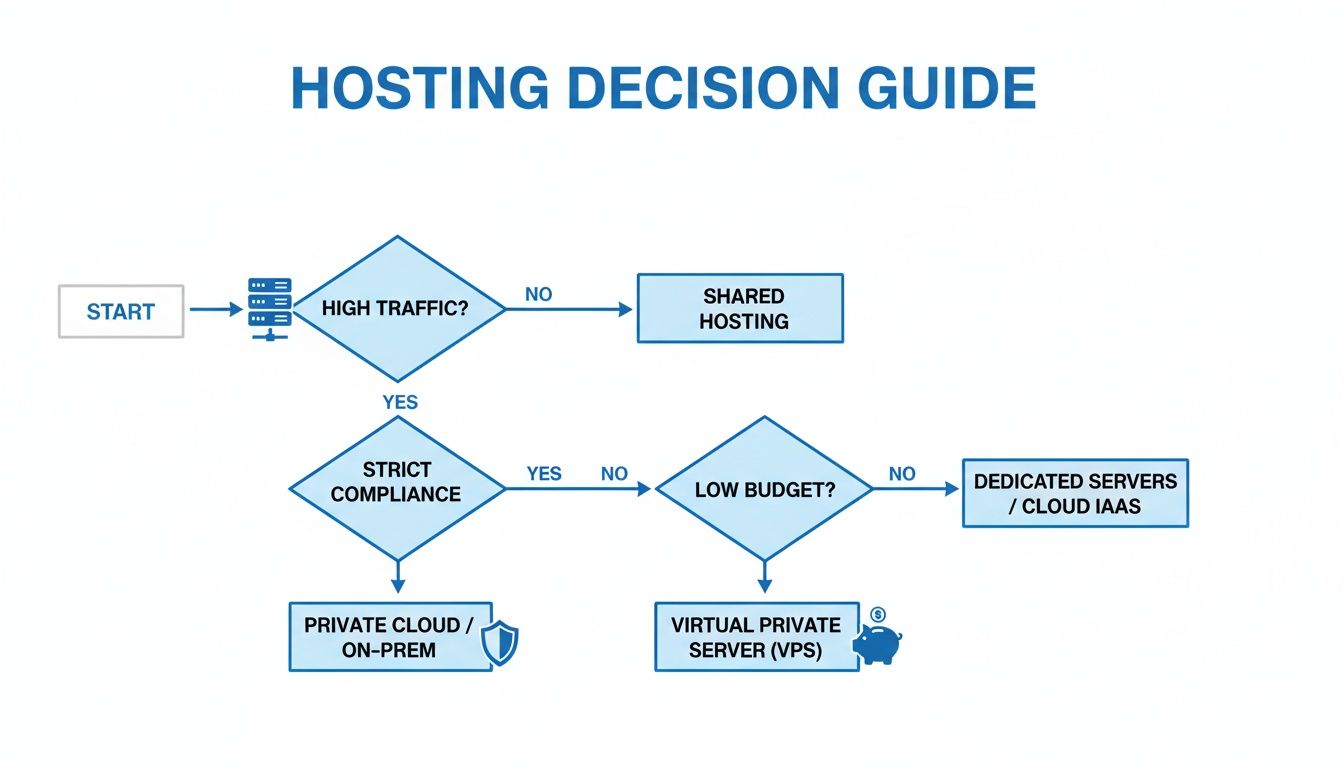
As you can see, while budget is often the first thing people think about, it's the non-negotiable demands of high traffic and strict compliance that really push the needle toward a dedicated server.
What Technical Skills Are Needed to Manage Each Server?
This really comes down to one thing: whether you opt for a managed or an unmanaged plan.
-
Unmanaged Servers: This is the deep end. You need to be comfortable working in the command line, hardening server security, installing all your own software, and hunting down problems. It’s a great fit for seasoned system administrators or companies with an in-house IT crew.
-
Managed Servers: This is the hands-off approach. Your hosting provider takes care of all the complex stuff—initial setup, security patches, ongoing maintenance—so you can just focus on your application. It’s perfect for business owners and teams who don't have that deep technical expertise.
What Is the Process for Upgrading from a VPS to a Dedicated Server?
Moving from a VPS to a dedicated server is a well-defined migration process designed to shift your data and applications onto the new hardware with minimal fuss. Here’s how it usually works:
-
Provisioning: First, your new dedicated server is racked, stacked, and configured to your specifications.
-
Data Transfer: Next, we copy all your website files, databases, and application settings from the old VPS to the new machine.
-
Testing: Before flipping the switch, you get a chance to confirm everything is running perfectly on the new server in a staging environment.
-
DNS Update: Once you give the green light, you simply update your domain's DNS records to point to the new server's IP address.
The entire process is carefully choreographed to keep downtime to an absolute minimum, ensuring your move to a more powerful platform is as smooth as possible.
Ready to give your mission-critical applications the power and security they deserve? Check out the enterprise-grade infrastructure at Soraxus and discover the perfect dedicated server or VPS for your project at https://soraxus.com.