Your Guide to Dedicated Hosting with DDoS Protection

Soraxus Assistant
January 14, 2026 • 25 min read
Think of dedicated hosting with DDoS protection as your own private, high-performance fortress. You get a powerful server all to yourself—a single-tenant environment—but it comes with a built-in security shield that's always on, actively blocking malicious traffic before it can ever reach you.
This integrated approach is the bedrock for any business that relies on its online presence. It ensures your server's valuable resources are spent serving legitimate customers, not fending off a digital mob.
Why DDoS Protection Is No Longer Optional
In many ways, your online business is just like a popular storefront in a busy mall. Your dedicated server is that prime retail space, and your website is the front door where customers come to shop. Now, imagine a huge, organized crowd showing up with the sole purpose of blocking that entrance, making it impossible for actual shoppers to get inside.
That's exactly what a Distributed Denial-of-Service (DDoS) attack does to your digital business. It’s not some sophisticated, stealthy hack; it’s a brute-force assault. The goal is simple: flood your server with so much junk traffic that it's completely overwhelmed and can no longer respond to real users. For any serious online operation, this isn't just a technical problem—it's a direct attack on your revenue and reputation.
The Real Cost of an Unprotected Server
Picture an e-commerce site during a massive Black Friday sale. Without the right defenses, a sudden, powerful DDoS attack could knock the entire website offline in minutes. Every single second of that downtime means lost sales, abandoned carts, and frustrated customers who will likely take their business elsewhere and never come back.
But the damage doesn't stop at the immediate financial hit. A successful attack shatters customer trust and can stain your brand's reputation for years. This reality makes one thing crystal clear: for SaaS platforms, online gaming servers, or any application that absolutely cannot fail, dedicated hosting with DDoS protection isn't a luxury. It's a fundamental requirement for survival and growth.
A server without DDoS protection is like a bank vault with the door left wide open. It’s not a matter of if it will be targeted, but when.
And the threat is escalating at a shocking pace. In just the first quarter of one year, a single major network reported mitigating 20.5 million attacks—an incredible 358% surge compared to the previous year. Attackers are now capable of launching hyper-volumetric assaults that exceed 1 Tbps. To learn more, you can explore the evolving DDoS threat landscape and check out some market growth projections.
This is why having integrated, always-on protection has become a non-negotiable part of any serious infrastructure plan.
How Modern DDoS Mitigation Actually Works
To really get your head around how dedicated hosting with DDoS protection works, picture your online application as a high-security corporate building. The whole point of DDoS mitigation is to make sure only legitimate employees and clients can walk through the front door, while keeping disruptive mobs outside. This defense system has to work on several levels, just like real building security.
Some attacks are just brute force—all about overwhelming your server’s capacity. Others are far more subtle and sneaky, designed to target specific functions of your application to quietly drain its resources. A solid mitigation strategy needs to be ready for both.
Defending the Network Lobby: Layers 3 and 4
The most common DDoS attacks you'll see are volumetric, hammering away at Layers 3 and 4 of the network stack. In our building analogy, this is like a massive, coordinated mob flooding the lobby, jamming the elevators, and blocking the stairwells. Their goal isn't to get into a specific office; it's simply to create so much gridlock that nobody can get in or out.
For a practical example, a SYN flood attack sends a rapid succession of "start connection" requests to a server, but never completes the connection. The server leaves these connections half-open, tying up resources until it has none left for legitimate users. These attacks saturate your server's bandwidth and network gear. It doesn't matter how powerful your dedicated server is—if its connection to the internet is completely swamped, it’s going offline.
Securing the Front Desk: Layer 7
A much more surgical threat targets Layer 7, the application layer. Instead of flooding the whole building, this is like thousands of bots calling the front desk at the same time, each with a complicated, fake delivery request. The receptionist (your application) gets so bogged down handling these bogus requests that real visitors are left waiting on hold forever.
These attacks are much tougher to spot because they often look like real user traffic. For instance, an attacker could repeatedly trigger a resource-intensive search function on your e-commerce site. The traffic volume might seem normal, but the database queries will chew through your server's CPU and RAM. This is where basic volumetric protection just won't cut it. For a deeper look at defense strategies, our guide on how to mitigate DDoS attacks has some great insights.
Modern DDoS protection isn't just a firewall; it's an intelligent global traffic system. It combines massive scale with sophisticated filtering to ensure only legitimate users reach your application, no matter the size or type of attack.
The Global Traffic Management System
So, how does a provider actually stop these different kinds of attacks? It comes down to a smart combination of intelligent routing and highly specialized filtration facilities. Two core technologies make this all possible: Anycast routing and scrubbing centers.
-
Anycast Routing: Think of Anycast as a global GPS for your website's traffic. Instead of everyone heading to one single address, Anycast directs them to the closest security checkpoint in a worldwide network. This immediately spreads the traffic out, preventing any one location from getting hammered. During an attack, this means the malicious traffic gets absorbed across dozens of locations near its source, massively blunting its impact.
-
Scrubbing Centers: These are the high-tech filtration plants of the whole security operation. All traffic—both good and bad—is routed through a scrubbing center before it ever gets near your server. Inside, advanced systems inspect every packet of data, checking it against known threat signatures and behavioral patterns. Malicious traffic is identified and dropped on the spot, while clean, legitimate traffic is sent on its way. This all happens in milliseconds, so your genuine users never notice a thing.
This one-two punch of distributed defense and deep-packet inspection is what creates the protective shield around your dedicated hosting. It makes sure that whether an attack is a brute-force flood or a surgical strike, your server's resources are always reserved for your actual customers.
How a Protected Hosting Environment is Architected
To really get a feel for how dedicated hosting with DDoS protection works, it helps to picture it as a multi-layered security system for your server's internet connection. It’s like having a highly advanced, intelligent checkpoint guarding the front door; absolutely no request gets to your server without being vetted first. The entire setup is designed to make sure only clean, legitimate traffic reaches your application, keeping it fast and available around the clock.
The process kicks off the very instant someone tries to visit your website or use your service. Instead of their request making a beeline for your server's physical location, it’s first routed through a smart, global defense network.
Step 1: Anycast Spreads the Load Globally
The first stop for all incoming traffic is an Anycast network. You can think of Anycast as a super-efficient global dispatcher. It automatically sends visitors to the network entry point closest to them. Someone in London connects to a nearby European data center, while a user in Tokyo connects to one in Asia.
This decentralized strategy is your first and best defense against huge, brute-force volumetric attacks. For example, if an attack originates from botnets in Eastern Europe, that traffic is absorbed by nearby network points of presence, preventing it from ever impacting users in North America or Asia.
The diagram below gives you a bird's-eye view of this process—showing how traffic is smartly routed, filtered, and finally delivered clean to your server.
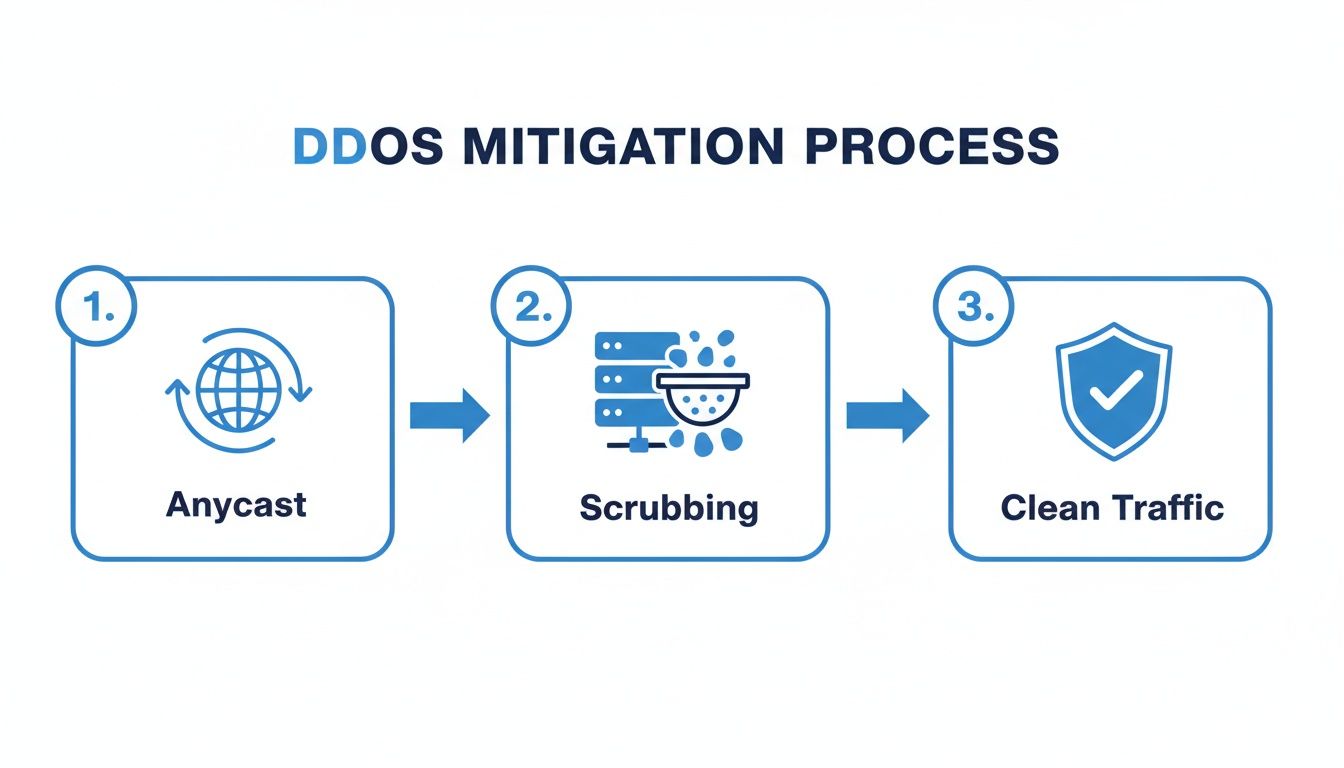
As you can see, this modern approach pushes the entire defense far away from your server, dealing with threats right at the network's edge before they can cause any harm.
Step 2: Traffic is Instantly Analyzed and Diverted
The moment traffic hits the network, always-on systems are analyzing it in real time. These platforms are constantly on the lookout for suspicious patterns, anomalies, and the tell-tale signatures of known attacks.
If any traffic is flagged—whether it's a sudden, massive flood or a subtle pattern that matches a known threat—it’s immediately and automatically shunted off the main path. This diversion sends the questionable traffic to a specialized facility for a much closer look, all without slowing down the flow of your legitimate users.
Step 3: Deep-Cleaning at a Scrubbing Center
This is where the diverted traffic ends up: a distributed scrubbing center. These are essentially high-tech water treatment plants for data. Their single job is to separate the bad, malicious requests from the good, legitimate ones. They use advanced algorithms and deep packet inspection to meticulously comb through the traffic, identifying and dropping anything harmful.
The filtering here is incredibly precise. It can neutralize everything from simple network floods to the more sophisticated and sneaky application-layer attacks that try to mimic real users.
A scrubbing center is like a sophisticated quality control checkpoint for your internet traffic. It guarantees only genuine, high-quality requests get the green light for delivery, while all the junk is tossed out.
After this intense inspection, only the clean traffic is left. This validated, legitimate traffic is then sent through a secure, clean pipe straight to your bare metal dedicated server. The end result? Your application only has to deal with real, genuine user requests.
This defense-in-depth architecture relies on several core technologies working together seamlessly.
Core Components of DDoS Mitigation Architecture
This table breaks down the key pieces of the puzzle and what they do.
| Component | Primary Role | Real-World Analogy |
|---|---|---|
| Anycast Network | Distributes incoming traffic across a global network to absorb large-scale attacks and reduce latency. | A global chain of post offices that automatically routes a letter to the nearest branch instead of a single central hub. |
| Scrubbing Center | Filters malicious traffic by inspecting packets, separating legitimate requests from attack traffic. | A water purification plant that removes all contaminants, leaving only clean, safe water to flow to your home. |
| Clean Pipe | The secure, dedicated channel that delivers the filtered, legitimate traffic from the scrubbing center to the server. | An express, security-cleared highway lane that only allows pre-screened vehicles to pass through to a final destination. |
| Out-of-Band Mgmt | Provides a separate, private network connection for direct server administration, bypassing the main data network. | A private service elevator in a skyscraper that allows maintenance crews to access any floor, even if the main lobby is overcrowded. |
Each component plays a critical role, creating a resilient system where the whole is much stronger than the sum of its parts.
The Lifeline: Out-of-Band Management
Even with the world’s best protection, your engineers still need a guaranteed way to access the server, especially during a crisis. That’s exactly what Out-of-Band (OOB) management is for. Think of it as a secure, private back door to your server.
While your main network is the public front entrance, OOB provides a completely separate and independent connection. For example, if a massive attack somehow congests your primary network ports, your team can still use the OOB connection to log in via a KVM interface, reboot the machine, or run critical diagnostics. It ensures you never lose control of your infrastructure, making it an essential safety net for any serious business.
Why Integrated Protection is More Than Just a Tech Spec
Let's move past the technical diagrams and mitigation jargon for a moment. Choosing a dedicated host with built-in DDoS protection isn't just about ticking a security box; it's a core business decision that pays real dividends. Think of it less as an IT cost and more as an investment in your company's stability, performance, and future growth.

When your infrastructure has an always-on shield, the positive effects ripple through your entire operation, from keeping customers happy to making your internal teams more effective.
Maximize Uptime and Protect Revenue
The most obvious win here is business continuity. For any business operating online, uptime equals revenue. It's that simple. Every minute your website or application is down is a minute of lost sales, squandered leads, and frustrated users heading for the exit.
Imagine you run an online gaming community with thousands of monthly subscribers. An attack-induced outage isn't just a minor annoyance; it's a direct threat to your income, sparking cancellations and refund demands. Integrated protection is your revenue's bodyguard, ensuring the doors to your business stay open.
A successful DDoS attack doesn't just cause a technical outage; it severs the connection between you and your customers at a critical moment. Integrated protection ensures that the line always stays open for business.
Safeguard Your Brand Reputation
In a crowded market, trust is everything. A high-profile outage can shatter that trust in an instant. Customers quickly associate downtime with unreliability and weak security, tarnishing the brand image you've spent years building.
Having a solid defense in place sends a powerful message: you're stable, you're secure, and you're a partner people can count on. In this sense, preventing downtime is as much a PR move as it is a technical necessity.
Enhance Application Performance
Here’s a benefit that often flies under the radar: better performance. When your server isn’t wasting its energy fending off a constant stream of junk traffic, all its resources—CPU, memory, and bandwidth—can be dedicated to serving your actual users.
What does that mean for them? Faster page loads, snappier API calls, and a much smoother overall experience. Your server gets to do the job you're paying it for. You’re ensuring that 100% of your investment in that high-end hardware goes directly toward delivering a great service, not fighting ghosts.
Simplify Security Operations
Trying to fight off modern cyberattacks is a full-time job. It’s complex and exhausting. When you choose a provider that bundles dedicated hosting with DDoS protection, you're essentially handing that relentless battle over to a team of specialists who live and breathe this stuff.
This is a huge strategic win for your own team. Here’s why:
- Reduced Alert Fatigue: Your engineers can finally tune out the constant noise of low-level threat alerts and focus on what actually matters.
- Focus on Innovation: Instead of reacting to threats, your developers are free to build new features, fix bugs, and push your product forward. This is where real value is created.
- Cost Efficiency: You sidestep the massive capital and operational costs of building and staffing your own in-house mitigation setup.
Think about a growing SaaS company. Its engineers should be improving the platform, not learning the ins and outs of BGP flowspec. By outsourcing protection, they get to innovate faster and deliver more value, knowing their infrastructure is rock-solid. That freedom is a massive competitive edge.
Picking the Right DDoS-Protected Hosting
Choosing a dedicated hosting provider with built-in DDoS protection is a serious infrastructure decision. It’s about much more than just comparing CPU cores and RAM—it’s about safeguarding your application's uptime and reputation. You have to look past the flashy marketing to understand the engineering behind their defense systems.
This isn't about finding the cheapest box on the internet. It's an investment in a resilient, multi-layered defense. The best partners don’t just give you powerful hardware; they operate a global network designed to absorb and neutralize massive attacks long before they ever get a chance to knock on your server’s door.
How Big Are Their Floodgates? Check Mitigation Capacity
The first question you should ask is about the provider's total mitigation capacity. This is measured in Terabits per second (Tbit/s) and, to put it simply, tells you how big of an attack their entire network can handle before it starts to crack under the pressure.
We're now seeing hyper-volumetric attacks that regularly blast targets with over 1 Tbit/s of junk traffic. If your provider's network can't absorb that, you're going down with them. Look for a network with a globally distributed capacity of at least 1.5+ Tbit/s. This massive overhead ensures they can handle the biggest of assaults without a single point of failure.
How Fast Do They React? Scrutinize Detection and Response
An attack can take a server offline in seconds, so the speed of detection and mitigation is everything. "Always-on" protection is the baseline, but you need to press for details. How fast is their always-on system?
The gold standard is sub-second detection and response. This means their automated systems can spot a malicious traffic signature, reroute it, and begin scrubbing it in less than a second. Anything slower is a recipe for downtime, as your legitimate users will already be feeling the impact.
Do They Stand Behind Their Promises? Demand Clear SLAs and Dashboards
A provider's promises are just marketing fluff without a solid Service Level Agreement (SLA). A good SLA is your guarantee, promising a specific level of service—usually 99.9% uptime or higher. It should also clearly state what happens, and how you’ll be compensated, if they don’t meet that promise.
A strong SLA is a provider's commitment to accountability. It transforms a vague marketing promise of "high uptime" into a contractually guaranteed business outcome, giving you peace of mind and financial recourse.
Transparency is just as crucial. A top-tier provider will give you access to a real-time dashboard with detailed traffic analytics. This lets you monitor incoming traffic, see active threats being neutralized as it happens, and get a feel for your normal traffic patterns. This visibility isn't just nice to have; it's proof that you're getting what you paid for.
What’s Under the Hood? Assess the Hardware and Network
Even the world's best DDoS protection is worthless if it’s defending a slow, outdated server. Make sure the provider offers modern, enterprise-grade hardware that can keep up with your application's demands. Pay attention to the core components:
- Latest-Generation CPUs: Modern processors from top-tier manufacturers are a must for handling intensive workloads without breaking a sweat.
- High-Speed NVMe Storage: For database-driven applications or fast content delivery, Gen 4 or Gen 5 NVMe drives provide a massive speed boost over older SSDs.
The demand for this kind of robust protection has fueled a massive global market. The dedicated DDoS protection hardware sector was valued at USD 4.34 billion and is expected to climb to USD 13.90 billion by 2034. This growth is largely driven by latency-sensitive industries like gaming and finance, which need that blend of on-premise speed and cloud-based scale. You can dig deeper into the DDoS mitigation market's expansion to see where the industry is headed.
Finally, confirm that the provider runs a globally distributed network of scrubbing centers. Having defense locations spread across multiple continents is what allows them to mitigate attacks close to the source. This not only improves resilience but also reduces latency for your legitimate users, giving them a faster, more reliable experience.
When you're ready to start comparing options, it's helpful to use a structured approach. A simple checklist can help you cut through the noise and focus on the technical details that truly matter for your business's continuity and performance.
Provider Evaluation Checklist
| Evaluation Criterion | What to Look For | Why It Matters for Your Business |
|---|---|---|
| Mitigation Capacity | 1.5+ Tbit/s global network capacity. | Ensures the provider can absorb massive volumetric attacks without their network failing, which protects you from collateral damage. |
| Detection & Response Speed | Automated, sub-second detection and mitigation. | Prevents service degradation or outages. A delay of even a few seconds can be enough to knock your application offline. |
| Service Level Agreement (SLA) | Financially backed 99.9%+ uptime guarantee. | Provides a contractual guarantee of service and financial recourse if the provider fails to meet their uptime promises. |
| Transparency & Tooling | Real-time traffic dashboard and attack reporting. | Gives you visibility into threats and proves the protection is working. Essential for operational awareness and incident response. |
| Network Architecture | Globally distributed scrubbing centers and Anycast routing. | Reduces latency for legitimate users by mitigating attacks closer to their source and improves overall network resilience. |
| Hardware Specifications | Latest-gen CPUs, high-speed NVMe storage. | Ensures the underlying server performance can keep up with your application's demands, preventing hardware bottlenecks. |
| Out-of-Band Management | IPMI, KVM, or other remote management access. | Guarantees you can access and manage your server even if it's under attack or the primary network connection is down. |
Using a framework like this transforms your selection process from a simple price comparison into a strategic decision. It ensures you partner with a provider whose infrastructure is genuinely engineered to withstand the modern threat landscape.
Getting Your Server Deployed and Managed the Right Way
Moving over to a dedicated server with built-in DDoS protection isn't just a simple server swap. It's a fundamental step up in securing your entire operation. To really get the most out of it, you need a solid plan for both the initial move and the day-to-day management that follows. This ensures the migration goes off without a hitch and leaves you with a truly resilient, high-performance setup.
The whole process kicks off with a carefully planned migration. The goal is simple: get all your data, applications, and settings moved over to the new hardware with as little downtime as possible. Trying to rush this is a classic mistake. A phased approach is almost always better, starting with a complete backup before you even think about moving data, and then thoroughly testing everything on the new server before you flip the switch.
Planning a Seamless Migration
A great migration is one your users never even notice. It’s all about minimizing downtime and making absolutely sure no data gets lost or corrupted along the way. Hurrying through the steps is a recipe for disaster—think broken files, long outages, and unhappy customers.
Instead, follow a proven process. Here’s a good roadmap for a smooth transition:
- Full Data Backup and Audit: First things first, get a complete, verified backup of everything. I'm talking databases, application files, user uploads, and all those little configuration files. This is also the perfect time to do a quick audit and leave any old, unnecessary junk behind.
- Configure the New Server: Get your new dedicated server set up to be a perfect clone of your current environment. This means installing the same software, libraries, and security patches. Crucially, get your firewall rules configured before any of your sensitive data touches the server.
- Data Synchronization: Tools like
rsyncare your best friend here. Start with one big initial transfer to get the bulk of the data across. After that, you can run smaller, incremental syncs to keep the new server caught up as you get closer to your final cutover time. - Final Cutover: Pick a time when your traffic is at its lowest to make the final switch. This usually involves one last data sync, updating your DNS records to point to the new server's IP, and then testing every single feature of your application to make sure it's all working perfectly.
Hardening Your Server for Enhanced Security
While your hosting provider is busy fending off massive network-level attacks, the security of the server itself is still on you. This is where server hardening comes in. The idea is to shrink your server's "attack surface" by closing off any potential security holes an attacker might try to wiggle through. Think of it as the second critical layer of your defense strategy.
Here are a few essential hardening practices:
- Firewall Configuration: Lock down your firewall. Block every port that isn't absolutely essential for your services to run. For example, if your application only needs ports 80 (HTTP) and 443 (HTTPS), there's no reason to leave port 22 (SSH) open to the entire internet. Restrict it to trusted IP addresses.
- Root Access Management: Never allow direct root login over SSH. It's just too risky. A much better practice is to create a separate user account with
sudoprivileges. This not only adds a barrier against brute-force attacks but also gives you a clear audit trail of who did what. - Regular Software Updates: Keep your operating system and every piece of software on it patched and up-to-date. Attackers love to exploit well-known vulnerabilities in old software. For a deeper dive, check out this guide on essential network security best practices to really bolster your defenses.
Proactive server management is what separates a secure environment from an easy target. Your DDoS protection stops the flood at the main gate, but server hardening is what makes sure that gate is locked, bolted, and reinforced.
Proactive Monitoring and Alerting
The last piece of the management puzzle is keeping a close eye on everything. Your hosting provider's dashboard is ground zero for this. The very first thing you need to do is figure out what "normal" looks like for your traffic. Establish a baseline by tracking its typical volume, daily patterns, and where it usually comes from.
Once you know what normal is, anomalies stick out like a sore thumb. This is how you spot the sneaky, low-and-slow application-layer attacks that might slip past automated filters. Set up custom alerts that are specific to how your application works. For instance, if a particular API endpoint should only get a handful of requests per minute, you can set an alert to ping you the moment that number spikes. This gives you an early warning to investigate before a real problem develops.
Frequently Asked Questions
When you're digging into dedicated hosting and DDoS protection, a few questions always seem to pop up. Let's tackle the big ones so you can get a clearer picture of what you really need.
Is "Always-On" DDoS Protection Overkill?
Honestly, no. For any business that can't afford to go offline, it's a must-have. Think about how fast a modern DDoS attack can hit—it can go from zero to a full-blown outage in seconds.
An "on-demand" system sounds good in theory, but it has a built-in delay. It has to first detect the attack, then kick in. In that gap—even if it's just a few minutes—your site is down. Your customers are gone. With always-on protection, every bit of traffic is inspected before it gets to your server. Mitigation isn't just fast; it's instant. If your revenue depends on an e-commerce checkout or a live gaming session, that's the only way to go.
How Much Mitigation Capacity Do I Actually Need?
This is a great question, but it helps to think about it a little differently. You're not just buying protection for your server; you're buying into the strength of your provider's entire network. We're seeing massive, hyper-volumetric attacks that can blast past 1 Tbit/s.
So, the number that really matters is the provider's total network capacity. You should be looking for a provider with a global capacity of 1.5+ Tbit/s at a minimum. That huge buffer, spread across scrubbing centers worldwide, means they can soak up even the biggest attacks without breaking a sweat. It's less about what you need and more about how strong their shield is.
Think of mitigation capacity like the height of a city's seawall. It doesn’t matter how big your individual building is; what matters is that the wall is high enough to stop the biggest possible tsunami from flooding the entire area.
Does DDoS Protection Stop Application Layer Attacks?
This is a critical distinction. The answer is only if your provider specifically offers advanced Layer 7 protection. Basic DDoS mitigation is great at stopping network-level floods (Layers 3 and 4), but it's completely blind to sneakier attacks that look like normal user traffic.
For instance, an attacker could bombard a search function or API endpoint with resource-heavy requests. The traffic volume might not trigger any alarms, but it’s designed to chew through your server's CPU and memory until it crashes. A truly effective solution has to include:
- Behavioral Analysis: It needs to learn what your "normal" application traffic looks like to spot anything unusual.
- Rate-Limiting: This stops a single user or IP from hammering your server with too many requests.
- Protocol Validation: It checks to make sure incoming requests are legitimate and not crafted to cause harm.
Before you sign up, always confirm that the protection covers all layers, from the network (L3/4) straight up to the application (L7). If you don't, you're leaving a pretty big door unlocked.
Ready to secure your infrastructure with enterprise-grade performance and always-on protection? Soraxus provides high-performance bare metal servers backed by a 1.5+ Tbit/s global DDoS mitigation network and a 99.99% uptime SLA. Explore our dedicated hosting solutions and build on a foundation you can trust.